Creating a Pokemon card in Photoshop Live

Chapters5
Energy and framing of a Friday live stream with casual chat and plans for cooking live while starting to gather files.
Dansky builds a custom Pokemon card in Photoshop live, turning a Jolton sketch into a full, print-ready design with careful layout, icons, and color theory.
Summary
Dansky guides viewers through designing a Pokemon card in Photoshop, starting from a Jolton illustration and moving toward a complete card layout. He explains using Firefly to generate the battle-ready Jolton pose, then traces and colors in Illustrator and Photoshop with clipping masks and live shading. The session shifts from digital painting to a more graphic design mindset as he wires up the card’s hierarchy: name, HP, type, moves, icons, and the legal text area. He experiments with layout options (stacked moves vs. side-by-side, left vs. right column for weaknesses/resistances), and emphasizes spacing, margins, and alignment to achieve a readable, collectible look. Throughout, Dansky discusses practical print considerations (63.5 × 88.9 mm card size, RGB working space, and print-ready borders) and teases how the final piece could be printed on quality stock with a gloss or satin finish. The stream also doubles as a learning vlog—sharing workflow tips (using clipping masks, smart objects, and Illustrator for icons) and inviting viewers to share progress in Discord. He interleaves live commentary with questions about typography choices, iconography, and how AI tools can speed up shading and lighting decisions. By the end, the piece converges on a plan: tidy typography, a bold yellow card base, a window-like backdrop for Jolton, and a cohesive color story that links the illustration to the card’s design language.
Key Takeaways
- Firefly can quickly generate pose concepts for Pokemon creatures, which you can then trace, color, and refine in Photoshop/Illustrator.
- Use clipping masks to color individual body parts in Photoshop, enabling non-destructive shading and lighting across layered pieces.
- For a Pokemon card, set exact print dimensions (63.5 mm × 88.9 mm) and work in RGB first, planning a print-ready export with a final border and border-consistent text.
- Organize information with a clear hierarchy (name, HP, type, moves, weaknesses, resistances, retreat) and test layouts (single-column vs. two-column moves) to maximize legibility on a small card.
- Leverage smart objects so repeated icons or elements stay uniform when you resize or update design elements later.
- AI-assisted features (like Photoshop turntable or AI shading references) can accelerate workflow, but you still manually craft shadows, highlights, and textures for depth.
- If printing, anticipate borders and safe margins; actual print sizes will require slightly larger borders and stock considerations to preserve legibility at small scales.
Who Is This For?
Essential viewing for Photoshop/Illustrator users who want to design and mock up collectible card art or game cards, and for digital artists curious about translating an illustration into a print-ready design with practical print specs.
Notable Quotes
""We need to put him on a card.""
—Dansky decides to design a Pokemon card layout around the Jolton illustration.
""You copy and paste this into Photoshop as layers specifically, and you then color all those layers blue, and then you add new layers with clipping masks to each of those body parts.""
—Describes the workflow for coloring and shading the character in Photoshop.
""This start to finish, this whole thing took six hours.""
—Quantifies the total time spent on the project so far.
""If you do decide to have a go at this, honestly, like send me your progress. I would honestly love to see it.""
—Encourages viewer participation and community sharing on Discord.
""63.5 mm by 88.9 mm... exact measurements of a Gen One Pokemon card""
—Mentions the precise card dimensions being used for layout.
Questions This Video Answers
- How do I design a Pokemon card layout in Photoshop step by step?
- What are the exact Pokemon card dimensions used for print projects?
- What are clipping masks and smart objects and how do I use them to color character parts in Photoshop?
- Can AI tools speed up shading and lighting in digital illustration, and when should I rely on manual methods?
- What’s the best workflow to go from vector line art to a finished raster-painted card design?
PhotoshopIllustratorPokemon card designJolton/JolteonAI-assisted shading clipping maskssmart objectsturntableprint dimensions 63.5mm x 88.9mmcard layout hierarchy
Full Transcript
Heat. Heat. Heat up here. Heat. Hey everyone, how's it going? Happy Friday. Yes, the end of the week is nigh. How are y'all doing? I'm looking forward to this. I've been absolutely buzzing with excitement all day for this one. This is going to be flipping fun, right? Let's get my files. Okay, chili's in the fridge. The chili has been taken care of. Nobody panic. I was like, "Oh my god, is this actually going to be ready in time?" Poppy was like, "You should go live to cooking with Dansky." So, first you add the beef mints, then season with salt and pepper.
Add some olive oil and your chopped onions and tomatoes. I mean, that would be that would be quite entertaining. You know, the first time I did that, if I streamed that, I'd set the kitchen on fire. 100% it would happen. Okay. Right. Any any Pokemon fans in here or is it just me? I'm going through a second wind of Pokemon phase. I like used to play it back in the day when I was like what 13 14 15. Feel like I feel like I've dragged Raquel into Were you ever into Pokemon Raquel? I feel like I've dragged you into the Let's Create a Pokemon fiasco.
I'm thinking of taking the Illustrator certification exam. Excellent. Very good. I should probably add that to my to-do list as well. Hey, Ka. I'm a Pokemon nerd. Excellent. Favorite Pokemon. What is your favorite Pokemon? I think Jolton's probably got to be one of mine. So, hence the illustration. Anyway, if anyone didn't uh catch the streams we did before, we did two. We quick recap. We did the line work. This this was a So, I I fed in loads of pictures of Jolton into Firefly and then I described the pose that I wanted. So, I wanted him in like a battle ready pose.
It nailed it first time, which was amazing. So, it did like a effectively like a cartoon. It literally mimicked the style that I bet it. So, I just didn't like the the ones from the cards and everything. So, I got the pose really quickly. Traced over it, got the line work, connected and closed all the gaps. Super important. Live paint bucket. Just dump in the color Bosch. And what's that? I don't know what that is. I think that's probably that's probably the It's just the same as the above. Ignore me. um and then just expanded it and ungrouped it.
So what you ultimately end up with Oh, and you can get rid of the stroke as well. So you can keep the stroke. It's kind of more of a stylistic choice, but for the style I was going for, you basically want this in pieces that you can pull apart. Um, you can do all this in Photoshop, and maybe that's my next challenge to try and paint from completely from scratch, which is scary, but um, one thing at a time. But you copy and paste this into Photoshop as layers specifically, and you then color all those layers blue, and then you add new layers with clipping masks to each of those body parts.
And then you brush in all the shadows, lighting, shading, and everything. And this uh start to finish, this whole thing took six hours. And honestly, I got to be honest, I'm pretty surprised by this result. When I did the Charmander, I was like, "Oh, yeah. Okay, I could do this. This is cool." But then when I finished this one, I was really like, I don't want to toot my own horn, but I was so proud of what I'd made with the the shading and everything. I've sort of saved the versions as well. So, this is kind of my first crack at it.
And that's kind of where it ended up. So you see this is fine, but then when you spend time on it and just layer in especially around the face more shadows and depth, it definitely does make a difference. So the Pokemon is there. So we kind of just he's just in a gray nothingness. So we need to stick him somewhere. And Kerry said we need to put him on a card. Hey Christopher. So, we need to uh Oh, Tanvir, hello. Long time no see. Um, we need to put him in a card. So, we're going to go more from digital painting uh graphic design today, which is going to be really cool.
And if we get this done, which I'm hoping we will, we're then going to make the card 3D. We're going to put it on a surface. We'll do some cool stuff at the end and try and present the finished thing. But yeah, we're sort of shifting gears from artsy stuff to design today, which is going to be flipping fun. Uh, if anyone does want to have a go at this, by the way, definitely check out the previous streams. I honestly I'd love to see someone have a go a crack at this painting thing because honestly, I if if you have a go at it, please do join the Discord, tag me, post it, whatever.
I would honestly love to see it. Especially if you're someone who, like me, isn't like a an artist. you don't do loads of digital painting. That would be it would be amazing to see. Um, and I cover all these techniques um, not on Pokemon, but on more more practical uses and stuff in my full Photoshop course linked below. Anyway, that's enough of that. It's not linked below. No, it is. It's linked below and it's linked in the chat. There we go. I had five hours sleep last night. All right. Just And be gentle. Oh, thank you, Ka.
That's very kind of you. That's That's me doing a heart. There you go. That is for you. Well done. So happy I'm done in school. Going to have to think about where I take graphic design next. Indeed. Um yes, it sounds cheesy, but the world is your oyster or your playground, whatever you want the world to be. But yeah, just try try loads of stuff if try things that you might like and you just you figure out over time what you enjoy doing. I think so. I mean, when I think back to school, it was like, "Oh, what do you want to be when you grow up?" Asking the 14year-old.
I don't know. Like a mini cheddar factory. Don't flipping know what I want to be. Right. Anyway, nonsense aside, I need to go raster for the last details. Oh, so okay. What What detail? Because Raalo, you're doing yours your scyther. nearly did a cipher and I thought that is gonna be hard. So fair play to you. Cool Pokemon as well. So you're doing it all vector, but which details are you going to do raster or are you going to like take the vectorness and like blur it, smudge it, all that kind of stuff? What is it that that is sort of making you think about going raster at the end?
And is are you going to do that in Photoshop or stick in Illustrator and like use blurs and things? Yeah, it's insane. A thief. It's so cool. A Raquel. I cannot wait to see the finished thing. It's going to look so sick. Anyway, right. Let's stop gushing over Cipher. Okay. Um, right. I've got my things. So, let's grab the Pokemon card. This is a Jolton card. So, I thought what would be quite fun is to redesign it. So, we're going to work with the information on there, but we're going to try and present it differently.
Some of this I don't even I don't even understand what this means. How did I even understand this at 13 or 14? Is a Pokemon X. I don't even know. EX. I I don't know what that means. Or a Pokemon V. Can someone explain what that means? I have no idea. Okay, so we got it. Yeah. So, this is kind of cool actually because we've we This is a lot of information. You've got the HP up here, hit points, health points, what it evolves from. Maybe we paint a tiny Eevee. That would be kind of fun.
We've got the type, which is lightning. So, there's obviously going to be like a yellowess. We're going to have to do some sort of background. So, we'll see how much time we got. I feel like Yeah, we're going to do a background. What number the card is, stats, attacks, weaknesses, resistance, retreat. Yeah. And I don't know what this is. What is this? Is this just like a a general about Jolton? I don't know. I feel like the hierarchy here could be done a little bit better. It feels a bit all over the place. Oh yeah, I want to see Zapdos for sure.
Just generally, what did you do to make the creature drawing? Oh, honestly. Um, oh, hey, Charlie. Hey. Hello. I replied to you on Discord, by the way. I'm not sure if you saw it, but just to just to let you know. Um, the creature drawing. So, I did two previous streams. So, I just covered it a second ago. Uh, a quick. So, yeah, outline, trace over, add the color, and then into Photoshop and shading. Um, and by the way, if you do decide to have a go at this, honestly, like send me your progress. If you get stuck with anything or you start the shading process and you're like, "Oh, this looks rubbish.
I don't like it." And you whatever. Just honestly, give me a shout and I'll try and help cuz uh I'm I'm not a I'm not a painter like this or whatever you want to call it anyway either. So, we can probably help each other. So, we're going to redesign this. Now, before I start, I need to get the exact measurements of a Pokemon card. And I need to get this right because I probably might get it printed at some point in the future. What are the exact dimensions of a Gen One Pokemon card? Let's just Google it and see if it gives it to us.
Uh 2, right? So, 63.5 mil. That is very specific. Okay. So, how are we going to do this? Well, first of all, let's set up our new file. Switch to millimeters. And we're going to go width 63.5, height 88.9. We're going to go 300. We'll keep it RGB for now. um just because it full color and everything, but obviously we might need to change that somewhere down the line to print it. Um yes. Do I want an artboard? It's a good question. I'm going to go no. And what we're going to do is I'm trying to think about how to do this.
So, we'll make a rectangle that is exactly the same measurements. 63.5 and then uh whoops, not pixels, millimeters. And what is it? 88.9 mm. Very specific there. Let's do that. We'll center this on the artboard canvas thing. And then we'll crank the canvas up. So now width width, let's just let's just smash it up to 3,00. We're going to do it from the center as well. And I have a theory that this should work because if I then want to go and drop it back down to crop at exactly that. I can then just add back in those millimeter dimensions back in there and it will trim it back down.
And then we're going to call this Pokemon card. convert that to a smart object and then I can double click it and then I can design in here. So this is where I'm going to actually design the card. This is going to be more of like a presentation board. And if I want to have ideas and things and what have you, I can just add stuff there. I think that's that's a pretty good way of doing it. And I can hear the cat meowing. Let's set him in before I go completely insane. What's that? What are you doing out there, Jonah?
Come on. Come. Come get comfy on a chair or something. There we'll pop you down He's going to be up over here trying to jump up on the desk in a minute. And I've got half a pint of Pepsi as well. So hopefully it doesn't get knocked over. Appreciate all the back and forth in Discord and such. Still plugging away. Excellent. Um going to get you that video. I'll have time next week. Thank you for explaining. Hey, you are very welcome, Charlie. Honestly, any questions, just shoot me a message and I will be there. Sorry, I don't know what happened there.
This This does happen. Uh, need to get the machine out of the car. Battery discharged yesterday. Oh, okay. Catch you later, Gorav. Enjoy your client. Cool. Found some grass in my coffee. Oh, lovely. Num, num, num. It's probably got some protein in there. Right. Right. Let's get some music on. Let's shut up. Let's get going. Um, any questions as we go through this shout. I will try and help. I think actually I'm going to grab this Pokemon card. What I'm going to do, this is quite a cool technique. So, I'm going to double the width asterisk to like multiply by two.
And then we're going to add this up. We'll do the curved corners later. We don't need to worry about that now. Then we can get rid of that and crop it after. Let's lock it. Let's grab our Jolton. Don't know what's in the MISK folder. And let's we'll smart object him. We can just drop him into the Pokemon card. He's ginormous. Let's shrink him down a bit. There we go. We are finished with you. Goodbye. But to tell you what, I got a better idea actually for this this reference card. I got an idea actually.
I will keep this off screen so it's not it's going to get in the way I think designing a little bit. So again, we're just Yep, there we go. Correct crop. There we go. Right, I can see the card. So, I'm going to size this fell up and try and pop him in the center. We could have his like paw or his ear sticking out, which would be kind of cool. And you could do this in Illustrator as well, but because there's going to be like textures and it might get a little bit artsy, I think Photoshop makes sense for this one.
So, we're just going to first of all define a space for him to exist in. And I've got all the text as well. So, the first thing we got to do is make a new layer. And type some text. And we're actually going to start by wireframing this. Um, we Yeah, Robboto is fine for now. Totes fine. Whoa. What's going on with the border? Why is there like a weird border around the edge? anyone else seeing that? It's like a weird one pixel line around the edge. some sort of screen render or something. How strange.
Yeah. Yeah. It's just I think it's that exact zoom. It's like 130. Let's go for 130%. It's still there. 125%. Yeah, it's some sort of weird screen render thing. Oh, that is going to drive me insane. Right, we got a new plan, a new plan. We're going to just We're going to convert this back to layers. Uh, all right. There we go. So, we got all our bits and pieces now. There we go. We got our card. That's fine. We'll just do it directly in this document. I got Jolion and we got text. Yeah, there we go.
We'll just work at 100% and then I should be able to Yeah, I've got the shortcut there as well. So that's I can jump back. And in fact, we may as well round off the corners here as well. Yeah, they look about like that. About 30. Okay. Right. Yeah. Yeah. No, I know what you mean, Shalley. Oh, have you just become a member? Oh, thank you so much. Yeah, it's one of those things. It just sometimes the edges go a bit funny at like specific zooms, right? Let's set the background color to we'll start with yellow because it's probably going to have some sort of yellowess to it.
Right, the first thing and I used to do this with all designs and I still do really just get the the words in first. So I've got them off screen here and then we would just start to wireframe it basically. So, are we going to do an Eevee? Probably should try and keep all the elements. So, we've got stage one up Let's make that smaller. And then evolves from Eevee. That will mean painting a little mini Eevee. But if I can manage painting penguins in my Photoshop course, I'm sure I'll manage a cheeky Eevee. Right, I got the health points.
We got his name. We got his info. So number I feel like that could be presented a bit better actually. The number of the Pokemon for sure. And right then we got the attacks and we're going to have to do some icons as well. We'll do that in Illustrator. That'll be super easy. So we're just going to lay this up. What do we got? linear attack, which sounds honestly quite boring. Fighting lightning. That sounds very weird as well. I might change the names at some point just so they sound better like thunderbolt or something. All right, let's just tab that down.
fighting lightning. And then we got space. We'll have to put some space for icons as well. Right. Nearly there. This is This is the the very boring, unsexy part. Don't worry, we'll get to the fun stuff soon. We just got to get all the pieces in. You don't really want to skip like wireframing something like this because Oh, that's Oh, it's put a little emoji in. Oh, that's cool. Um because it is pretty important and there's no point having a design that looks nice if functionally the hierarchies upside down or whatever. So, like I I see a lot of it when I review work um where you've got a design that looks nice and it's aesthetically pleasing, but functionally it could do a little bit better.
Um right, what's this? I don't know what this this is at the bottom. Illis Sui G. I think this is all like legal rubbish. 29 out of 131. Again, I don't know what that is. There's the Pokémons. This is his number. Does anybody know what that is? The star. I don't know whether to include it. Um, we could do I mean we probably should do cuz it is part of the thing. Do you know what I mean? But Okay. And then we've got the the legal bits at the bottom. So Nintendo, Game Freak, all that stuff.
Do you do web design also? I want to start learning web design. Does someone have recommendations? Um, I I actually spent most of my career doing UI design or web web design. Then around the time it became UI and UX design. So that's what I did for the most part for a job and then I freelanced a lot. um did graphic design and the logo design as well, but I was predominantly a UI designer, which is it was amazing, but it's kind of sad now because it's a skill set that I don't really like like I enjoy it and I think I was pretty good at it, but I don't really have any sort of reason to use it now, you know?
And I definitely prefer the Photoshop stuff and the logos and branding anyway. Uh it's always nice when you get like a project that's like um like I did one recently. I worked on uh a brand identity but it had a bit of web kind of attached to it um like web site design homepage um product pages and stuff. So it was nice to dip back into that. In fact, we do a bit of that in the Photoshop master class. We do some wireframing, full blur, landing page design, all that stuff, right? Um, I'm going to ask chat GBT what that information in the corner is cuz I feel like I should understand it before I decide what to do with it.
Oh, Illis Dossui is the illustrator artist who created the artwork on the card, right? Is okay. So his name is Suie. Okay. So would it make sense to put my name instead? Probably. G the regulation for tournament legality. And then pre um Yeah. No, I think it Let's lock that. In fact, we'll lock Jolton as well. And we'll lock that just so I can select the text a bit easier. Okay. Right. Yeah. So, we should include some of that. So, we got illas and we'll put Dansky cuz I made it. Um, then we've got G.
That's kind of more like a logo. And then got pre, which means something I've already forgotten. En for English. I don't know what the star is for, but we chuck a star in anyway. 029. So that's the the card number out the set, not the actual Pokemon number above. And then that is down the bottom. So this looks pretty scrappy, but this is generally how I would start something. And then it would be a case of structuring it and organizing it and creating some sort of hierarchy. Well, my son Leah did say to me earlier, he was like, "You you could get this printed out, right?" And I was like, "Oh my god." Yeah.
like get the card printed on like a really nice material or laminated or whatever and then get one of those card those plastic cases and yeah, pop it up on the shelf or It's not often I get to see my stuff I make printed, so it'd be quite nice to make a little collectible out of it or yeah, put it on a put it on a gold chain, whatever. Right. So, in terms of hierarchy, we need to we need to sort this out. So, Jolton, his name is pretty important. We're gonna make that bigger. We're not worrying about font size and consistency right now.
The moves in the card, they are also pretty important. Where we position these though is still up for debate. Right. Stage one, the health points. Okay. Do we have that up there? Oh, we got the type as well. We need to add a lightning symbol somewhere. So, let's just pencil a really terrible one just for now. Yeah. So on the original card, it is top right. Jolon stage one evolves from Eevee. So this is all a bit of a a cluster duck, you might say. Stage one has got Eevee in there. So stage one. See that?
That feels weird. Having evolves from Eevee. That makes sense. having stage one like if there were going to be multiple stages. I don't know. I'm not sure. I might get rid of that text. Evolves from Eevee. Where do we Where do we put you? Pretty small as well because it's not really that significant. And maybe we float a little Eevee somewhere on the Do we have his name front and center? I'm going to turn this off for now. Let's get rid of that and move. Ah, hang on. We got the card number as well. Lightning Pokemon height and weight.
See, I feel like the number should be quite big. I feel like the number we could do a hash symbol and I think there are a lot of Pokemon now. So was 0135. I feel like this should be pretty prominent for a collectible card and it should be at the top. That's quite nice. HP. I don't know if some of this should be down near the attack stuff. So, we've we've got the number. So, let's remove it from there. The legal bit down here can be super tiny because we don't we don't care about that.
Let's pop it there. This can This can be equally small actually. So, let's just do this super quick. Like this. This sort of stuff is not really the priority. for me anyway. So, we're just going to do that there the number in the set and we're just going to line this so it kind of lines up. We don't want to have any any sloppiness here. So, we're going to try and set a margin. Um, any other pointless information that could go down here? We could even run it all along the bottom. Actually, it concentrates the weak electric charges.
Right, I'm just going to GPT this as well. Is this a general description on the card? What is the purpose of this text? There we go. That line is basically the Pokemon's flavor text or Pokédex description, right? So, it feels weird to me that it's just dumped down the bottom. Although, I don't know. The purpose of these cards is more for battling and fighting, isn't it? So, maybe it is really not that important. And then we've got to decide if we're going to go central alignment, uh, horizontal. Are we going to stack these. yeah, for the text here, we'll probably want to put this in an area text box.
That is definitely not that size. That's just silly. So, if we drag to create an area text box, we can then resize it. though we can either stack it and have the moves going along. I feel like the horizontal layout's more flexible because if you have a set of Pokemon cards, you don't know how much text you're going to have and having a stacked layout is much more flexible. If you kind of have go with columns, you can end up with one column that's weirdly long and it can look a bit weird. So, this having it the the moves stacked is a lot safer, but arguably a bit boring.
And this is a one-off card, so we're not trying to design something practical, like totally practical. I'm not going to be designing all the other cards. So, we could take a few creative liberties, I reckon. Weaknesses. Yeah. So, we could put the How can we stack this? Yeah. So, we could do it one and two. Let's try that actually. Let's try it. So, this text here, this is point text. So, we need to turn that into area text as well. And then what we can do is we can try stacking this into two columns. The good news is that every card does I think just have like two main moves.
So So we'd have our moves there. We've got space above for the icons and then the weaknesses could sit under there kind of as they do. Or we could have them stacked on the left. You you tell me what you think works better. We could do the weaknesses, have them down the right side. So, we're sort of still leaning into that that horizontal layout, but the weaknesses are on the right instead. And is there damage numbers? Yeah. Yeah, see they're they're missing something from here that that I like in the the games as well. There's no damage numbers.
So, the bottom the bottom one has got 90 plus, but the top one doesn't have a damage number, but it says it there. I'd be tempted to actually have the damage number so I can see that. Oh, this attack does 30. And this attack does what? 90. 190 plus. Let's just go 90 for now to keep it cleaner. Do you know what I mean? So, at a glance, I can immediately see how much they do rather than having to dig into the text. And I can I can probably then change the text and reword it so it's not repeating.
Actually, no, this is quite important. It does it to one of your opponents Pokemon, but I can just see at a glance what the numbers are. Then we need space for up to three or four icons as well. So, let's just we'll grab our lightning icon. A few different ways we could do this. We could we could have them up here or we could have them down the side. So, this is let's just say it's like a it's going to have three different icons, but we could do something like this. right hand makes sense. What do you mean by having it over here?
Yeah, I don't think that the these aren't going to have loads of text. It's usually just like an icon. And I don't know what this would be, but it's blank on this card. So, so we could do something like this and shift that over. And then maybe this is just one icon. Actually, I've done them the wrong way around. There we go. And this is kind of cool as well. So if we did have the name up here alongside the number, it makes sense, but then you've got space underneath to just add a little bit of context.
So you know, it might be Charizard evolves from Charmeleon. So this would be kind of a actually quite like the central I think I like that central placement actually. We could put it on the left maybe. Or or another idea, we put the number over here and we go for a left alignment. Make it super prominent and we move the HP somewhere else. Yeah, we need to get this somewhere. So, it's a lightning type card. We could maybe even put it in the box, but I don't know. I mean, it says lightning Pokemon. It's got all this info here.
Uh, let's move Let's move him up a little bit. There we go. That's going to give us a bit more space, which is clearly clearly needed. There we go. We got a bit more space for this. So, we're kind of playing Tetris almost designing stuff like this or designing most things really. We're just trying to fit it all together and get some sort of hierarchy, which is um totally broken at the minute because these damage numbers are standing out more than the name, which isn't quite what I want. So, let's make the name a bit bigger.
And for height and weight, we could even use icons as well. we could Let's go type. I got an idea. Turn this into a bit more of a thing. Do something like this. So there we go. We got the type, the height, and the weight. That kind of makes sense to be grouped. So we can take that away from there. HP, health, health, health. Where are we going to stick this? We could stick it down here. Actually, feels a bit a bit random and a bit bit like it's just floating in no man's land to some extent.
Yeah, something like this could work. Let's get rid of the quotation marks. That description. I mean this whole section here is more formative. So we're trying not to focus on style or anything yet. Dividers, boxes, we're not really thinking about that. We're just getting stuff in the right place. This doesn't really have enough space up here. wonder if we could move this down. Maybe we I like how his ears popping out the top. That's cool. You see what I mean? We have to just constantly just move things around, tweaking. So something like that. Unless we centralize it, which looks weird throwing that off.
At least here we have like bit of asymmetry going on at the top Oops. Something feels a bit weird down here. I don't know if that should go up there. We got to make sure his ears don't crash into the whole thing as well. Yeah, this bit doesn't the HP doesn't feel quite right. The placement Unless it is inside the box element like Let's hide Jolon for a minute just so we're not contending with him. We could fit him however we need to. Live strick. I don't know what that means. Uh, let's turn off hyphenation.
We don't want that on because a lot of the time it can look rather ugly. It's just that HP getting the health. Yeah. Anyone got any suggestions where to put the HP? It's one of those things. It sort of health feels relevant to stats, which is this is damage and the health kind of makes sense, but I don't know. Let's try a slightly different layout. Try something slightly different. Bottom right corner. Okay. My next question is why made you go for bottom right. This is slightly different. You can change the text again in a sec.
So we could do side by side instead. head and then split those across horizontally and then HP could go there. So again, totally different layout stacking the attacks side by side. Yeah, it's I instinctively want to keep health like, you know, health, damage, attacks together. The difference is that this has just got that three-digit number whereas this has got, you know, numbers, names, icons. So these two have just got so much more to them. So trying to kind of structurally put this on par with these other big things. There's no like descriptive information to go with it.
Unless we did something No, I don't think that's going to look good. I was going to I was going to say we could stack these and then have the the health over here, but that's just an absolute waste of space on something where we're trying to be smart with our spacing. I think I quite like them stacked side by side. I need some different music. If you were a Pokemon, what kind would you be? Me, Snorlax. No, I got no idea. On an empty G card, the health is bottom right. I think that's why natural, but they do a 33 format.
Okay. Hey, Bum. Yeah, it's interesting that they put it pretty prominently on the original card. Yeah. So, on the original on the original, actually, the health is probably the biggest thing. Yeah. Crap. I kind of missed that Do you know what? Maybe the number should be smaller. Maybe the HP should be pretty beefy. So, we'll have it in the same size and we'll go 110. So at a glance if you are battling then you can just instantly see maybe the card number could go down there instead instead of the HP. In fact actually that makes a lot more sense because this is the number of the No, sorry.
The number of the Pokemon within the context of all of them. This is stats. So, it makes sense for the stats that are about this Pokemon. From a like, you know, from a trainer or battling point of view, it makes sense to have that together. I think same here. it doesn't make sense to have the description in between the attacks and the weaknesses. So, I think a lot of their original card does make sense. And to be honest, we could probably even Just keep it pretty similar to the original in that sense. Have the icon there.
Take that out. We could change height and weight for icons. So, just to be a bit different. I don't really like the HT for height and the WT for weight. It's just, you know, for weight. We could do like a little some sort of weight symbol that could be construed as a handbag. And then for height, some sort of some sort of weight thing. And then a height icon. Whether that makes sense or not, I got no idea. I'll get into the the UX of Pokemon cards. So, as long as those icons very clearly do convey weight and height, which I hope I can somehow manage.
And then we got the type. We got the attacks, the resistances, which actually on the original card pretty much look like this because there is none. Description down the bottom. And then a card uh sorry a Pokémon number down bottom right on some of the basic ones. They've got HP top right. Yeah, I'm pretty happy with that actually. I think I think it will look pretty good. Let's just because this will actually sit inside a a shape. So it could be a circle or a square. I'm just going to block it out for now. So we got it.
So this will be something like that. That will be your element. Obviously clearly a lightning Pokemon. bring Jolion back. Ah, that could work. And then the the lightning icons below as well will be treated the same. How often do you do live stuff? Is this a rare special event or do you have some kind of schedule? No, it used to be twice a week. Um, I've started doing uh some some contract work at the minute and uh the work side of stuff's become very busy. So, I'm trying to figure out when the best time to do it is because sometimes after a day like I'm pretty knackered.
Friday is always a really good day because there's nothing on Friday. Um, Friday is like more of a YouTube day. So Friday is the kind of day of the week that could be very consistent. But I feel like I one stream a week for me is just not enough. So I don't know. Maybe maybe a day on the weekend. It's difficult cuz he's trying to find time for like family and stuff as well. And I'm terrible at taking time off. So So Friday is an absolute definite yes for streaming. And I'm trying to figure out a good day to consistently do.
All right. I we could do it without the box. And it's not necessarily going to be yellow as well. I think it does need the border actually, which is uh a shame because it's going to cut into my design a little bit. But let's let's duplicate that shape. We'll get rid of the fill. We'll do the border on a separate layer. So, we'll just do it gray for now, just to see. Uh, align it to the inside. There we go. That's not too bad. Depends how thick we make it. We could slip that in there.
Yeah, if we can get the legal stuff in there. Just super. Obviously, we're selecting two point. This would be really small actually for something print. You just wouldn't print 2 point. So I think in act I think when I do it finished it will be like double the size easily. That text is very small but you'd never print something at 2 point. It just wouldn't you won't be able to see it. It's ridiculous. Even if you you could go down to six. If you're going lower than six I would check because six is pretty tiny.
Yeah, that immediately looks better with the border as well. I don't know what I want to do with that. Unless you like have it fill the entire top half. Yeah. Which could be quite cool. Anyway, let's start with um these legally bits down here while my brain marinades. Um can't really see what font they are, but if I had to guess, it looks like some sort of condensed font. So, I'm just use Bevas for that. It's not a million miles away, actually. It's quite small, so it's very difficult to see. Yeah, like an expanded Yeah, something like that.
And it's inside a box. So it looks kind of like this with a black stroke around it. And then there's another box with the pre and the N. Same height. This one's kind of reversed actually. It looks like a blue. So, we're just going to copy this across and change the color and go pre and we got N. Just make that a little bit Whoa. Tiny bit smaller. So yeah, something like that. Let's make this ultra tiny now because it's not the most attractive thing. So let's just put it really tiny. And this is what's going to replace So we'll have straight this bit here.
Oh my goodness. Yeah, we could have done this in Illustrator. It look a little bit cleaner, but when we get to adding textures and stuff, it's going to be a lot easier doing it in Photoshop. Okay. Right. Next, we're going to do the lightning icon. I got an idea for this. So, I'm going to hop into Illustrator and we'll just make a new document. We'll do something like this. I'm very funny when it comes to getting a good good lightning shape. There's different ways you can do it as well. Just so we're matching the angles pretty closely.
There we go. This isn't isn't the cleanest way to create a lightning icon, but my brain just kind of sees the the problem and then it's like, right, let's try and figure this out. That bottom shot part. Yeah, it should be the same height, I think. But then, obviously, I've marked the angle up there. So, we'll copy that over. Bring this in. Yeah, there's probably a super clever shortcut to do lightning icon, but it's escaping my brain. In fact, actually, I just just thought of potential one. We can scale that until we get the perfect one.
There you go. It never comes when you need it. Yeah, it could be we could do um all sorts all sorts of different backgrounds. I'm not even sure which kind of way to go with it really. Some of them are very I think the original ones got like smoke and lightning and all sorts of stuff. Hey Danish. Looks a little off. What are you making? Uh, Pokémon card. Yeah, I know what you mean. I think it's a bit of optical trickery going on. Yeah. Is anyone else seeing that? I feel like this area here on the left feels bigger than the bit on the right even though it's not.
Anyone else seeing that or is it just me? Is that what you saw? What you're seeing, thief? Let's chuck it in for now anyway. So, what I'm going to do, we can always change it. In fact, we'll throw it in as a smart object because then if I change one, it will update them all. And I kind of got an idea what I want to do for the the icons. I want to sort of do like a bubble shape. It's a good opportunity to practice shading as well. So, we'll do an ellipse. We'll do What sort of size we going for?
Oh, no. That's way too small. Come on, Dan. Let's go for 30 by 30. Nope. Too small. 36. 36. better. Now, what we're going to do is we could probably do this with our blending options rather than I was going to do some brush work, but actually we can set this up as a layer style probably. So, we'll strip out the fill. We'll go with an inner shadow and multiply so it blends onto the Zero distance and we'll bring it down. We could crank the choke up a little bit. And then obviously you can drop your opacity if you want to.
Then we're going to switch to gradient. We're going to build this up. We're going to go to radial. We're going to go black to white. Yeah. Ah, no, no, no. I can't move the central point of the gradient, I don't think. No, this is only going to go from the center. So, that's not going to work. But that's fine. We can just add a layer, clip it, and we'll try using a very soft brush. We'll see if this works. Ah, clipping to something with blending options doesn't usually work. So, we could we could stamp it in like so.
That's kind of a highlight. And then we could go back in here and just add a really subtle gradient to reinforce that spherical shape. So, we drop the opacity down. Let's make the white a little bit more dominant. So, it's kind of like giving it a bit more of a curvature in a shadow. Yeah, we could probably drop that back a bit as And then we got our highlight there. We can add a mask so it doesn't extend too far. And then the highlight we can set to overlay. So then it blends the color behind.
So, if I'm like changing the color, you can see whatever we've whatever color we use, it's going to it's going to work. Then we got our icon here that we can slap onto this little bad boy. And oh crap, the icons underneath. Yeah. Let's put that on top. So, we'll call this um sphere. We'll call this highlight. We'll call this Let's obviously stick the icon in the And yellow. Yellow's a funny one as well. Yellow's a real funny one. Um, so I'm actually actually No, I'm not going to change it now. If you Yeah. black and opacity and transparency with yellow can look a bit weird.
So sometimes you can add like a bit of warmth to this color so it doesn't look as murky. But because I don't know what the background's going to be yet, I'll leave that alone. And then for this, what we doing for Black or I don't know if yellow is really going to stand out very much. Let's just try copying the layer style and we'll paste it just to see what it looks like. Uh we'll leave it black for now. We can always change that. So we'll group it together. in fact, I tell you what, we will smart.
Oh, no. We can't smart object it. Unless No, that's all right. If we need to update it, it's pretty straightforward. The lightning is a smart object, so that's cool. We'll group it instead. When you smart object everything, if it's got transparency between those layers, it can't support that because it's kind of like condensing it into one layer. So, we'll call it lightning orb. There we go. And then that is going to replace our terrible one up here. Smaller versions of this as well appear down here. I don't know why the bounding box is so ridiculous.
Not sure why it's like that, but hey ho. So, this has got one And then this second attack has got three and they should all be a bit smaller. So let's scale them by a percentage. So if I need to reuse them somewhere 75%. So if I ever need to update anything, I can just scale them size by 75. We've not even got to fonts yet, but that is fine. Oh, I might go back to the left align. You need dividing lines. Yeah, we need something, don't we? some sort of container divider. I'm still not 100% on the layout, which is a bit annoying, I think, cuz you said, Raquel, you preferred the weakness, resistance, and retreat on the right.
And I feel like I'm inclined to agree with that as well. Something like over here, won't it? Unless we do that. We do 30 we crank this up. That's probably a bit much. I was going to try and crank it up enough where I could have the icons alongside. I think it looks a bit weird that it's just it's just way too big. Yeah, it looks totally totally mismatched. Unless we had the attack damage at the end. That could work. And we could actually still even stack them side by side. So, let's just let's do this.
Now, I'll update the text again in a minute. This is probably why you spend a bit longer on wireframing first, but heyo. I'm going to call this something different because fighting whatever it was was a bit lame. Quick attack. Oh, what was it I did before? I moved them down, didn't I? I got an idea. What if we have these three icons and they span the height? So, we'll adjust all that. And then here, if there's only one icon, they can just sort of sit blank. That might get a bit busy. Or we just leave it off.
Oh no, I've broken this here. Uh, let's rasterize it for now, just so I can move it around a bit easier. And then we've got containers, dividers, all sorts of other elements that we can use. So let's just throw in some boxes. Yeah, that's a bit better. in some sort of structured thingy. Meduda, I think some metallics would look quite cool as well with some of these numbers and description. This this bit needs some sort of structure as well. I could go box. I don't want everything to be too boxy. turn off. See, that could even be a oneliner.
I'm going to just try it as a oneliner because I could condense that wording into one line. and and evolves from Eevee. We could do a little Eevee in the corner maybe. see then it comes to style now. So whether we go for something linear with boxes, do we round the corners, do we go solid fill, do we go brush stroke and make it totally totally different style. I think we should start looking at type actually a little bit. This is going to really help. Um I know the type of font that I want. Yeah.
Know the sorry the boxes they're just for wireframing purposes at the minute. It's good because as soon as I added them over here it's like oh yeah this will benefit from some sort of container. So soon as I take that this is just kind of floating around in no man's land. So at least by visualizing it, I can see, oh yeah, some sort of box would work. But maybe here we get rid of these. We put a divider in. But yeah, it's it's all an iterative process. So I want like a sports font almost. I know the type of font I want.
I just can't I can't think of one that is it something is yeah not quite not quite beas unless actually no I've got some wider variants of um oh actually maybe some of these the where's the wider ones No, it's not quite what I'm looking for. Like a sort of sporty dynamic font. Geographesque bold. Go on then. Comic sense. No. Yeah, possibly. Let's give it a go. Oh, wow. There's lots of different Oh, okay. I've just downloaded a trial, but there's lots of different versions. So, which one do I want? Yeah, that's quite a nice font actually.
Right. Well, let's install the trial version. How much is it actually? Oh, I can find that out later. Ah, very good, Andra. Very good. Oh, that's so funny. Sport head. Have a look. Oh, maybe Just looking at a bunch of fonts. Yeah, I wouldn't say it's like sci-fi, but there's characteristics of very sort of sci-fi style fonts and sporty fonts. I'm thinking my head I'm trying to mix H Lora number two. It's got some good numbers. I'm going to try that. Laura, let's just give that a sec to install. I'll try sport head as well.
See It's the numbers that have got to look really good as well. H Unica. Oo, that's got some nice numbers. 18 fonts. Oh, I've got that already. Wait, what? House Unica. There we go. Wow. A lot of fonts there. And then what was the other one? Sport head. Ah, yeah. I think it's cool. This is a little bit much. Not quite what I'm going for. No. Well, maybe the boxes are placeholder now for my brain to use. Another one usual. That's quite nice. Oh, I've got that as Let's try that. You Obviously, we've not got to font color.
Oh, I think that's quite nice. Maybe it's less sporty than I imagined. Oh, yeah. That's got that's got a nice Q and a nice K as well. A little bit different. Let's try see what it's like for body copy. You sure? Why are you not updating? And again, when we're playing around with this, it could be size, it could be color. We're still using black at the minute, so it could be that the black is pretty pretty heavy. Let's take these boxes away because they are not setting my world on fire. No, make a bigger price.
Whoa. What the flipping heck have I done over here? Oh my goodness. What have I done? Dan. You've accidentally moved the boxes around. Oh, yeah. We're definitely getting there. I'm starting to I'm starting to feel pretty good about this actually. This uh Oh, the cat's right next to me. Hello. Do you want to come and say hello? Is it intermission time? Come on then. Yeah, I know the punch emoji won't be there. Um, we'll that'll be an icon. So, we've done the lightning icon at the minute. Um, we've got the the weight icon. We've got the height icon.
Those are quite small, so they need to I mean, I think it'll make sense with the weight because you've got pounds. Do you know what I mean? You don't probably don't even need an icon, but it'd be like a It would just be a bit more visual. Hello, sausage. I know. Oh, I know. This is your favorite place, isn't it? Just being held by dad. Oh, amazing. Hey, thank you so much. Oh, don't worry about it. We are We are very much in the thick of it right now. Yes, a baby. Andrea, honestly, Andrea, you would absolutely love this fella.
He is a big ball of just please love me. Um, I think that dividing line actually makes quite a lot of difference. I'm really liking that. So, we can copy that for the below. Just as long I've got enough vertical space. I mean, the background's still yellow as well. It doesn't have to be yellow. We could completely switch it up. There's so many different elements that it's kind of like you've got all these different elements. Think of them as like different categories of things we got to cover like font, spacing, color, type, boxes, no boxes, icons.
And it's like we're sort of progressing all of them at different levels, but they're kind of all progressing together at different speeds, if that makes sense. But honestly, it just depends kind of how who do we have here? Yes. It just depends how people prefer to work, you know. Like I always My process is I know I know my process is never like a straight line. I'm sure there are plenty of designers that do their wireframe, they lock it in and then that's it. Boom. Right to the end. I'm uh my process is a bit more messy and unstructured.
Right, let's go and check out this site for icons. I use these. These are great. I use these on my site. They plug directly into Framer, which is what I use to build and design my site. And they just pull straight through. I wonder if they've got one for weight. Um, what would you call it? Like heavy. What other words describe weight, height or size. SVG. I mean, could could do barbell. Uh, any chance I could take him home with me? You can rent him. Yeah, this is what I was thinking for. Wait, something like that.
we'll do these icons now. This will be super easy, I mean, I'm being a I'm being a bit lazy here. We could just recreate that. So if we we pen tool it thicken it up. Square. Get rid of one piece. Rotate it 90. Center them both. Bring them down so they connect. Scale tool. Underrated. Scale it down like this. There we go. Snap. Drag that in. This is all keyboard shortcuts that enable moving around to be a lot faster. round off the corners. And then we'll do like a we could do something for height Then this one as well.
Something similar to this is pretty straightforward. We'll do a square. We'll scale it in a bit. We'll scale this out. And then we'll just grab a circle Snap it together. Snap it in outline mode. And oh god, it's not snapping. Whoa. And then we can go and refine the scale. Do we want to round the corners off? Yes, a little bit. Maybe nudge that up Hey Bobs. Yeah, I like this one. Not so sure about this one. Uh, and I'm probably going to have these as solid fills just so we're being consistent with the other icons.
Let's enhance that a little bit. Maybe dial back the radius. or not. Let's try that. Sort of get a feel for style. Paste it as a smart object. Shrink it down. We can replace that terrible scribble and drop it in. Oh, I wonder if there's a setting to turn off completely turn off aliasing in Photoshop and view as a vector because in Illustrator you can view you get pixel view. I wonder if there's a view that the Photoshop that flips it the other way. Hey girls. I don't know if there is Let's make these a bit smaller.
Yeah, that's better. You see, we're just making lots of little adjustments. And then we could Yeah, we sort of need to figure out spacing and margins. The number as well and style. This is probably where I need to get inspiration on different design styles. I've not really got anything planned for what I want to do with it. Like we could do like a brush stroke or something. Go brush stroke style. I mean, there's loads of different styles. Um, okay. Let's let those thoughts just marinate a little bit. What about this thing? What's that? That's a rock weakness.
So, Pokemon rock icon. It's hard to see because it's so Oh no, sorry. It's not rock. It's fighting. It's a fighting Pokemon. Handy guide. Oh, actually, this is really handy. Right. So, we're just gonna we use the same icon, bring you up. Yeah, once you once you learn these tools and you you can zip around Illustrator pretty quickly. There. What we got here? Come down. What sort of style have I got on the lightning one? It is very sharp, isn't it? I was just thinking I was going to round the corners off, but actually maybe just go for the the sharp style.
Yep, there we go. Make sure the gaps are consistent. I might just use that as is actually. And for this I want to reuse the same thing as well. going to grab this and stick it over here fighting icon. And for this one, we need a color. It should have a color really. And so should lightning actually. So let's go and ah this is a bit better. This is a bit easier. We got a neutral. That's much better. I should have done that from the start. That's what I get for introducing color prematurely. Right. We need to add some colors.
So, let's get these things popping out. Um, best way to add the color is Let's try this. Clip it to Nope. Can't do that. Add a mask and then just blend it through. Um, possibly if you wanted something a bit a little bit punchier. Oh, actually, yeah. Yeah, that's a nice little color combination. So, blend if what it does is it lets the shadows underneath come through. But I'm only letting it come through a little Could do highlights probably a little bit strong. So we'll drop that to 75. maybe. So, at the minute, I'm just trying to find a nice Oh, no.
The It's way too bright. You got to be white or not at all. No, not even white, It's going to have to be a darker color, isn't it? And I think, yeah, we could do like an outline with the overlay. That's definitely going to stand out more. So, if we're doing a Let's do a fighting one as well. We'll do it full size first of all. where are you? There you are. And then now I should be able to change the color of this Right, let's change that to like a what was it? Like a rocky sort of brown color.
fighting something like that. No, I'd love a cookie. Give Give me the cookies, please. Andrea be like, "No, Dan, you don't get a cookie. Finish your work." Oh, whoops. Oh, little bit of um juggling layers around, but there we go. We've got a a finally got a a fighting icon. Let's do the other size as well. I think we'll go for what? 65 70% Go for 70. So, we've got two different sizes there. We'll use the smaller one here. So, what is it? Times two. So, lightning is really weak to fighting Pokemon. So, let's plunk that there.
Maybe these should be some actual Let's put some actual boxes in because these lines are stressing me out. I don't like them. We're going to go for We'll go solid at the minute. We'll try that. We'll round the corner off. See, we like what we get. We're going to make them taller to accommodate everything and obviously that. Oh, yeah. Of course, that is the problem is I've heavily used blending modes. As soon as I change the color, you see my thunderbolt lightning icon at the top. It changes based on color. I'm a flipping turkey. So, we've got all this stuff blending through into the background.
But if we smart object it, watch what happens now. It's not going to change color. So the disadvantage of the smart object earlier is actually the advantage now because it's going to lock that appearance which is amazing. So yeah, and even when I smart object it, you can see there's a little shift there with the uh opacity and all that, but it's it's fine. I can I can deal with that. So, we'll move that up there. We're going to go what? 70. And now I can stick that on there and it stands out regardless of the color.
Align it vertically, centrally. We'll go with a lighter bit of text color for these. Try and be as obsessed as possible with spacing and alignment. Like when you have text in a box like this, like this is never good. This is never good. It just looks super sloppy. Just snap it to the box and then align it visually if you need to. I'm going to do a little bit more padding on here as well. So alter option and drag from a corner. And you can resize it from the center. It's just going to give us a little bit more breathing space.
And then I can do this. Uh, I'm going to keep these quite close together. So, go for one, two, three, four, five, six, resistance, retreat. I'm not sure what those values are meant to be, but they are totally blank on the original card. There we go. We're starting to get somewhere. It's coming together. We are getting Z. And I mean, let's just put the radius on this box to eight as well, just for consistency sake really. And I have not really figured out what my margins are, but we'll just make that up for now and at least line them up.
No, no, we're not going for all gay all gay. We're not going for all gray. The problem I made, I kind of shot myself in the foot a bit, was I talked about wiring and the wireframing and the importance of it, and then I just sort of almost sped past it because I was just impatient. But I started with a yellow base. Um, which is fine, but actually it probably would have been better to start with something a bit more neutral, especially when creating the icons. You're still looking for a flipping font. it's annoying, Angela, cuz I've when you when you said I mean I don't know the context.
You just said like this is the word I got. What do you think of? Um, what am I doing? It it conjured up a font in my head, but it's just hard to describe. Right, let's get these in. I mean, we're not I wasn't planning on using gray because it's just a little bit Well, it's just drab, isn't it? But it's really really cool to be able to see the icons popping off the color. It does look really nice. So, let's just let's keep uh see this. Yeah. So, we've got a border and this they're almost the same, but not quite.
So, I would personally either make them exactly the same or make them look intentionally different. I'm going to make them intentionally different and I'm just going to shift everything in just so there's a little bit more breathing space. It's going to cost cost me space. So, I'm I'm losing space to move things around. So that is your tradeoff. But I think it's worth it. Then we'll align all of this. So we've kind of got something to align to now, which is lovely. Yeah. So you see we could start playing around with weights and italics and I need the That's the wrong text, isn't it?
So I mean I've changed the move name. So, but yeah, I think it was called linear attack, which sounded just a bit crap. we'll paste the original copy back in. Anyway, and then we do Yeah, we got we got this width here. So, this is cool. Going horizontal does give us that flexibility. I'm going to bump the line We'll set the tracking to zero because it's quite small. We'll set the line height to five. see that's too much. I like giving it a bit of breathing room, but when we're on like a card like this and we are sort of quite pushed for space, um I think it's just no, probably not a good idea.
I mean, she know. Not sure about the divider. Like I like what it's doing. I'm just wondering if a container is a better approach. So something like this. But then you obviously run the risk that you could get the whole thing looking super boxy, which isn't going to be great either. I don't know. Let's Let's try it. Photoshop nicely lining our guides up, which is great. I mean, let's let's try it anyway because it's fun to explore, right? Uh So, we're kind of flipping it around a And this is before we even really get to playing with color.
And for this one, we can set the text back. So again, we're just reinforcing that hierarchy. You know, this is the main text. Everything was black to begin with. So there's you've obviously got hierarchy in size, you've got hierarchy in position, you've got hierarchy in weight, but we hadn't really played around with hierarchy in terms of color. So by making that like a lighter gray, we're sort of setting that back and saying this is secondary information. We could even bring that down and have the lightning bolts kind of straddling the edge a little bit. And if we wanted to, we could That's a bit crap.
So, it is quite boxy, but you can't say it's not organized. So, I'm kind of defining my sort of small font sizes now. So, I'm just going to just round that 4.0 whatever to four. So, I'm just in a few places where I'm pretty happy with it. I'm just tightening up some of the consistency between the sizing. There are smarter ways to work and all sorts, but I just my brain sometimes I've just I'm very like I've got my way and I'm set in it and I just quickly speed through and quickly update And uh it's it's really quick.
So just making sure we're using the same weight. do we have enough space to move that down there and have another attack? Probably not. as we bring his box up. That's kind of cool. It's almost like a sort of like a window. The shadows are a bit terrible. I don't know. That definitely needs refining. We'll sort that out. So, again, we're changing the design here. bringing the box up, which kind of I think it sort of acts like a bit of a backdrop and it I think it looks quite cool. Um, but like practically as well, it gives us that little extra what 10?
No, 60. Yeah, we've just gained 60 pixels. So, it is a little bit of a a dance if you like a bit of a back and forth trading off one thing. You add, you know, like if we added an divider back in here, it's going to make the box taller. So, we're squishing things back So, but then now I can nudge this up, which means maybe I can get that second box in. probably not. But um there was there was a brief brief bit of hope. I'm actually going to get the original card because I'm not really setting this up as something for print.
I'm sort of setting it up more for the concept and mocking it up and whatever. So, let's just grab this. We'll chuck it on top and we'll just check size-wise how we're doing. Not very well by the looks of it. That text is way bigger. This is too small. Balls. That's better. yeah, this super small. I think it all needs to come up at least a point. Yeah. So the two there becomes a three. Yes, that is better. In fact, let's use this as a bit of a guide. So we'll change that to regular so it's a bit lighter.
spacing maybe seven. Then again, we might not be able to have the box. Maybe that's okay because it is very box-like. So, let's throw some of that in. Wonder where else I can put this number or the lightning symbols. I mean, if we could get rid of the number and have these alongside the thing, kind of like they do on the original. From a layout point of view, we save space. Could we highlight that in some way by making it like ultra bold? I don't know. I feel like the damage now, I feel like the damage needs to be That's something else as well.
I'm not entirely sure what that one is. Yeah, I'm loving that backdrop behind Jolton. That kind of window look. I think we'll paint an Eevee soon as because it lets me just just switch it up and just do something else for a bit. And I think yeah, generally if you get stuck on one bit, don't like bang your head against the wall. Just move on to something else. This is what I've been doing through this process. So if I'm thinking, oh, I'm just can't think what to do for this. Loving that text, by the way.
That's cool. Then I would go and just work on this icon here or this thing here or and come back to it. Right, four needs to become five. And now it crashes into his ear, which is flipping great. Good job. But again, we're spacing top and bottom. We're trying to balance everything where we can. That's not going to work, is it? Um Maybe we can keep some of this information at four cuz what's this? This is four, isn't it? Four medium. Yeah, let's keep it at four medium. It's just this that had to go up a bit.
Yeah, this one liner. Um, for the bottom, let's set some margins here just on the sides. This will be helpful just so I can kind of go down here and line this up. Definitely starting to get there. Starting to come together. And then these lines of text. Even these, they're opposite sides, but I'm going to line them up. Yeah. So, when we're presenting information, it's just that sort of consistency. Why do I feel like someone's behind me? Oh my god, Poppy made me paranoid. Is it you? it's the cat. I think she's going to walk in any minute and just scare the crap out of me.
Did you try leaving the back legs behind the frame? It would give the impression that it's growing out of the card. Yes. Like this. Yeah. We've done we've done a bit of It was a good little I quite like it, but I don't mind it either way to be honest. I think they both look cool, but it's a bit of a space saving technique because we are a little bit strapped for space because if I copy this down for the next attack, it sort of crashes into the description at the bottom. I'm going to drop it a tiny bit.
Oh, no. I want to know. 4.5 is too close. The oh so frustrating game of designer Tetris. Let's make this text a bit smaller. Let's go for seven on that. Then we'll drop this to I don't know 10. So what we got? Five, seven, 10, and four at the minute. I don't have too many font sizes. Oh, there's a room outside. A I've got an idea. I've had an idea. I was going to put the height and weight with these, but I don't think that really makes sense cuz this is different That looks What? That That's a That's like a real Oh yeah, that's So on the right it's a real one.
Oh, really? Yeah. It's not going to be gray. Well, not not necessarily, but yeah, you should make it yellow. Pink. We're playing designer. Why would I name pink? We're playing designer Tetris at the minute. Trying to fit all the information on. So, I've got another attack that I need to go underneath. Do you think you could print one out for me? Put it in my collection. Sure. I will give you a good price. 9.99.99. That looks so cool. Yeah, it does. I really want a real Jolon card or a flare one or a Well, you can't have one.
You're just going to have to deal with the one that your dad makes you. That's fine. Andrea says, "Hello, kids." Hello. Hello, love. To you. All right, Governor. How can I shorten this? Would it be paper or is there a way you can actually put make it Pokémon card material? Yeah, you can print it on a really nice stock with a gloss or satin finish or Wait, with a gloss, would it make it like shiny? possibly. Uh, oh yeah, just brain short circuit. Gloss it would. Satin is kind of like in between matte. Gloss is very reflective.
Yeah. Then you could put like an EX on top. Make it easier. Shorten. right. I'm put my headphones back in because my brain is trying to do multiple things and it's shorting out. Okay. Goodbye. Goodbye. Can you shorten this text? There we go. I'm just using GPT to There we go. Just shortening the text. So, what was the other text? I think it's actually quite short. So, just by shortening it with the old GPT, we've saved that fourth line. And this one's fine anyway. we need a new icon as well. This shape here. There is a way to create this very easily and I'm going to try and remember and probably fail and embarrass myself, but we're going to give it a go.
So, what is it? Six sides. So, we'll get it pointing up and down. And this one. Yeah. So, what does it all the way? It It's like that. Oh, I don't like that. It looks a bit jagged. I'm going to I'm going to push it a bit more. I think I It's a horrible shape. Unless it's meant to be rounded a bit on the end. Maybe maybe I could deal with that. All the other shapes are sharp, though. Oh, we'll just do it and see how it looks. Um, so that's a gray one. let's grab this.
Now, if I edit that, it's going to change all of them. So, we need to duplicate via copy. So, this one now, we can call it I don't even know what that resistance is. Metal normal. It might be normal. Actually, I'm going to go normal. We'll call it normal. Normal Is that actually part of an episode? Because that's really flipping weird. Right. So, now we can go and edit this and make it like a light gray. Change the color. Because we've set it up like that, it's quite easy to just edit it. Oh, I didn't do the icon.
So, we'll paste that in there. Smart object. match the size. Maybe a tiny bit bigger. Save and close. And maybe a teeny bit bigger. And there we go. So, we got that. And we can slide that in over here. And switch the other ones out. Boop. Uh, let's keep that at the top. We'll keep it at the top and we will lock it and hide it. We're getting there. It's not too bad. I think I'm kind of lucky here cuz I got one of these in his foot. If we were designing this like as a a template that has to flex across hundreds and hundreds of cards, there'd be other parameters we'd have to consider.
But like and even like spacing would probably be bit tighter in places than I would like personally. But because we're designing this more just for kind of just a one-off card. Whatever. I think we'll be all right. Really hard to check. I'm going to take this text here and I'm going to I don't It feels random. So, what I'm going to do is I'm going to put it in chatb and say reward this Jolton description. Nice and short. Start with a sentence with the word jolon. So I wanted to start by saying jolon blah blah blah blah because it concentrate it just I don't know it just feels a bit weird saying it.
Maybe that's just me. It's sparkly. So, it's done one. I'm going to do a shorter one as well. The icing on the cake is that it lines up perfectly with the margins, but I don't know if I'm going to be that lucky. Yeah, something like that. And we can left align it It almost meets the margins. It's so close. I might even be really naughty and just If I nudge that to 4.1, no, 4.05. Do you know what I mean? No one's going to be able to tell the difference, but you hit those margins. It's a bit naughty, but And up here is still a bit of a mess, isn't it?
So, what sizes have we got? What do we got? What do we got? What do we got? So, we want to try and match these sizes if we can. We got 12 there. We got 14 there. So, let's just either make them the same or make them different. So, we'll go 12 for that. Yes, we're definitely doing it every Friday. Um, we will do two. I just need to get a regular second day in every Good night everyone. Like and subscribe to daddy. Yes, do exactly what the child said. Good night, sausage. Yes, every Friday.
Definitely. And then I'm trying to figure out the the other day. Hey, no worries. No worries. Yeah. No, we're not going gray. I don't think I do. I like it, but it's just a bit boring and bland. But it's giving us like an idea of how colors could look. So, even if we don't end up going gray, the lighter gray could be lighter color, the darker gray could be darker color, whatever that ends up being. You know, like a purple would be quite nice for this back box here. So, it doesn't mean that it's necessarily going to be gray.
But it gives us an idea of how it could look. We're using solid fills over dividing lines or whatever. No dividers. And you can see where the light and the dark areas are. Sometimes it's good to strip out the color from one bit, in this case the entire background, and then it just helps you focus on the other stuff without obsessing over color too much. Because if I if my whole background's yellow like I did earlier on, I could then be designing and playing with color on all the other bits to match the yellow. And then if I change the yellow, nothing works.
Good night. You're not going to bed. Are you going to bed, Andrea? No, she's saying good night to Eli. Sorry, that sounded solo accusatory as well. What? Going to bed? Oh, excellent. Yeah, honestly, like we we're definitely doing these Fridays this sort of time, 5:00 p. p.m. UK time or maybe a bit later. The evening uh sessions seem pretty popular. But if you've got questions about Photoshop Illustrator, honestly, just come armed with questions. Uh, you know, it's usually pretty chill on a Friday anyway, and I'm more than happy to demo things live if it helps.
So, bring your questions. Anyway, what's that? 14. Just finding the right placement for it all. N that up a bit. Kind of lucky that I can sneak around the jolon character. This bit down here that Last thing, I might lose the Eevee and instead I might change that to the number So if I if I get rid of that there. Well, I did want to paint a little Eevee, but it might just be a bit weird floating in the corner. So, I might sack Eevee off. We'll put that in a folder and call this um legal legal stuff.
Maybe we move that over here. Got my guides. And then this, we can then do that there. Move it down. Bring this up so that left margin and bottom margin is pretty equal. Just trying to do it by eye. It's pretty close. And then by shifting that around, I've I've got more space. So I could probably bring this down a Oh, I love that. The thief wants to see a thinking message. Now I want to design a Pokémon inspired by Dan. Maybe this could be a group project. Yeah, I mean I'm I'm out there. I'm I'm barking at everyone to have a go at this this illustration thing cuz seriously like for anyone who's just joining like I'm not a digital painter.
Like I'm really not um yet using a lot of like typically photo manipulation skills. Shameless plug. I cover this in my Photoshop course. Using those skills, I was able to create this. I'm so flipping proud of this. I got to be honest. Like cuz I've used Photoshop for so long, I was relatively confident this would look good in the end, but like I thought it was going to be really hard and it was tough. But to go from like a Where's the vector? I'll show you the vector if anyone's not seen it yet. It's just a chance for me to show it off because I'm I'm so bloody proud of it.
This is what it started as with like simple vector shapes for the pieces. And then this is all just painting, brush work, whatever. And I'm not like a crazy talented painty Photoshop artist person at all. Like my drawing is awful. So, terrible at drawing and and I was able to do that. So, and it's just using the right tools and techniques as well. And even going through this like like so many of you were throwing out tips and I was trying a tool and this this gave a better effect here and tweak that there and it's still pretty if you zoom into some parts it's still it's still pretty rough, but a lot of it's getting the shadows and highlights in the right place.
Like some of this is still pretty pretty rough and could definitely be improved, but when you actually like zoom out and zoom out nice and far, it's like oh yeah, that looks that looks pretty cool. Oh yeah, the sparks. So, they were just a brush. Some of the visual effects like that, they they look really good, but they're so simple. Like, yeah, the the streams are live on the channel if you want to see the full process. but it's just literally like uh show you I'll show you. I'll show you. where is it? Oh, burger.
What's the brush called? Thunderstorm. Is it this? I think it's this. Maybe it was one of these. No. Yeah, I think it was one of these. And it was just like a piece of the thunder. So I just kind of cropped a few pieces out and just Yeah, you got one there. You got one there. Just a few little bits and then added some glow. Just It's just subtle but kind of in the right places. But the the biggest difference is the the shadows and the highlights. When you go from version one, which is a good start, but it's still relatively flat, and then you layer it in.
You get so much more depth. And this is another really this is a really good use of AI that I actually really like. I know it's like the most controversial divisive topic in the world, but I took this version, ran it through I think it was Firefly and said, "Oh, Rue, out watching you." Sorry, the cat's in the kitchen. I ran this through Firefly and said like I can't remember what the prompt was but like can you add better shadows and highlights and lighting to this and it didn't it made like obviously a completely different version not like this at all but it showed me where I could work on the shadows and highlights.
So as soon as I looked at that AI version I was like oh my god the tongue's got so much detail. Bosch added in shadows and highlights and things. It helped me sculpt the face. So, I kind of used the AI thing as a reference to help me figure out where to put shadows, highlights, and all that stuff. So, uh that's one use where I quite like it. It helps me do more illustrative stuff, if you like. But I still got to do it. Honestly, I would I would pick if you if you want to have a go at it and practice the techniques, um I would start with like a Voltob or something or a Jigglypuff.
Yay. Let's just geek out over Pokemon. Lol. start with something like this to try the techniques because it's you don't want something that's got loads of body parts whereas this is like a sphere. Um a jiggly puff pretty straightforward. I started with a Charmander. So that was the first one because it again for that same reason it was a lot simpler. And then once I did that, I was like, "Oh, this has actually turned out all right. I'll go and do another one." A jolon. What was I looking at just then? Oh, yeah. Jigglypuff. Yeah.
So, start with something like that. Raquel's doing a scyther, which is flipping insane. Yeah, it's looking amazing. But look how many body parts it's got. It's got so many different pieces. Um, so it will look insane, but like if you Yeah, like if you wanted to have a crack at like a vault orb. Sorry, we're going off on a tangent now. There's a really good exercise that again, shameless plug. I cover the exercise in my Photoshop course. There's an entire…
Transcript truncated. Watch the full video for the complete content.
More from Dansky
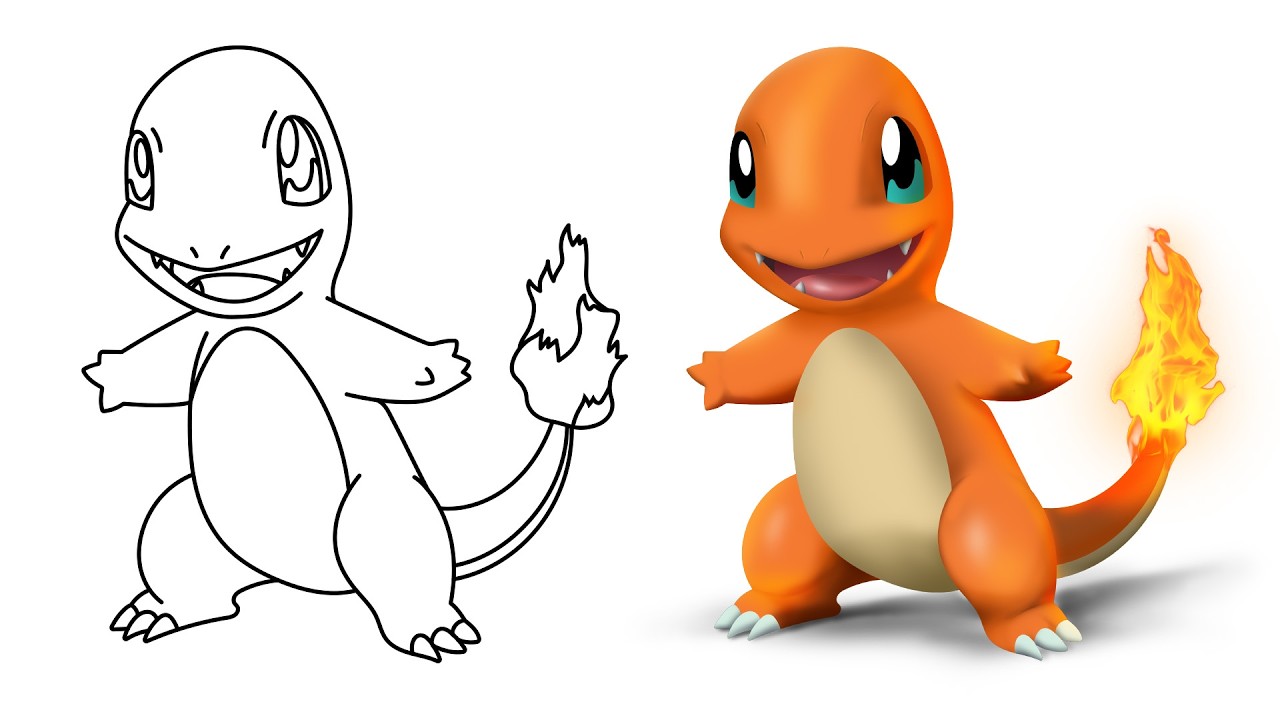
Get daily recaps from
Dansky
AI-powered summaries delivered to your inbox. Save hours every week while staying fully informed.