RDT: Lets try out the new GitHub Copilot App!

Chapters6
Marlene greets viewers, confirms audio and video, and invites chat participation from around the world.
Marleen explores the GitHub Copilot app live, showing how it unifies coding, planning, and UI tweaks in a single canvas with fun, interactive demos.
Summary
Marlene from GitHub hosts Rubber Duck Thursdays and dives into the brand-new GitHub Copilot app. She demonstrates how the app can run on a unified canvas to interact with local projects, switch between a browser-like in-app environment, and open files in Copilot. The stream features a playful Rubber Duck game as a live example of building and refining a small project with agents, plans, and automation. Viewers see plan mode in action, where the agent’s steps are exposed before execution, helping guard against incorrect assumptions. There’s emphasis on integrations with VS Code, the possibility to run multiple agents in parallel, and the ability to use automation templates to handle recurring work such as issue triage. Marlene also discusses using open models, bringing your own keys, and how Copilot can work with different model backends. The session ties to Microsoft Build coverage, highlighting Cassidy’s on-stage Copilot app demos and the broader GitHub presence at Build. Throughout, Marlene encourages hands-on testing, sharing repo links, and promising a GitHub Copilot app experience that blends front-end visuals with back-end code work. The tone is friendly and collaborative, inviting viewers to try the app, experiment with plans and automations, and share feedback or Easter eggs like the secret duck combination.
Key Takeaways
- GitHub Copilot app provides a unified canvas to manage projects, run agents, and view diffs directly inside a browser-like in-app environment.
- Plan mode makes the agent’s proposed steps visible before execution, helping users validate logic and reduce errors.
- Automation templates let you set up recurring tasks (e.g., daily issue triage) and run them on a chosen project with parallel agents.
- The app supports multiple model backends (including open models) and lets you bring your own API keys for Copilot workflows.
- Live experiments with a rubber duck game demonstrate practical, interactive front-end and back-end integration within Copilot, including real-time file updates and commit/diff visibility.
Who Is This For?
Essential viewing for developers curious about the GitHub Copilot app, agents, and automation workflows, plus anyone who wants a hands-on look at integrating AI-assisted coding with interactive front-end demonstrations.
Notable Quotes
""This is Rubber Duck Thursdays... it is just a stream where we hang out, we talk about GitHub, we learn new things together""
—Marlene sets the friendly, community-focused tone of the stream.
""We are testing out the new GitHub Copilot app""
—Intro to the main topic of the session.
""Plan mode where you can ask the agent to think through stuff and then give you a plan of what it should do next""
—Shows how plan mode provides transparency into agent reasoning.
""You can run multiple agents in the background""
—Highlights parallel agent execution capability.
""If you want to try this out yourself, please go ahead and download it""
—Encourages audience participation and hands-on testing.
Questions This Video Answers
- how does the GitHub Copilot app integrate with VS Code and GitHub repositories?
- what is plan mode in GitHub Copilot and how does it improve AI-assisted development?
- can Copilot app automation templates handle daily project triage tasks?
- how can you use open models or bring your own keys with the Copilot app?
- what were the standout features shown for Copilot at Microsoft Build?
GitHub Copilot AppRubber Duck ThursdaysPlan ModeAutomation TemplatesAgent OrchestrationOpen Models and Custom KeysMicrosoft BuildInteractive UI with CopilotVS Code Integration
Full Transcript
Hi everyone. Hello. Hello. Let me know in the chat if you can hear me. Um, welcome to Rubber Duck Thursdays. This is the AMIA version of it. And yeah, going to try and have a good stream today. My name is Marlene. Um, and yeah, today's stream is is going to be pretty relaxed. And if you have not been to Rubber Duck Thursday before, it is just a stream where we hang out, we talk about GitHub, we learn new things together as well in this stream today, I thought we could go ahead and experiment with the GitHub Copilot app.
But while I wait for everyone to join the stream, maybe let me know where you are calling from. Um, can everyone hear me and see me is the thing. If you can hear me and see me, let me know where you're watching from. Let me know how your day is going. Like what you've been up to today or what you've what have you been working on is a good thing to ask. Um, I can see. Okay, perfect. Hi, good to see you. Hi, welcome. Welcome to the stream. Hello. I did see someone saying they are watching from Ethiopia on the YouTube.
So, hi. We are streaming today from LinkedIn and from YouTube. So, it's great to see everyone. Um, where are you where are you watching for? Uh, let's see. Atlanta, is someone out? I feel like I'm not sure if this is Atlanta or if it's where someone is watching from. Hi, I see someone from Kenya. Um, yes. So, today's stream we're going to be talking a little bit about what is up in the GitHub space. Hello. Um, from YouTube, we can see I see that someone's calling in from London. I'm actually also in London. I say this all the time, but I'm also in London, by the way.
It's kind of sunny today in London, which is amazing. It's not always sunny, by the way, but it's been like fairly good weather. So, wow. I see someone Mark Markian from Austria. That's super cool. It's always just nice to know where everyone's calling from, you know? I always feel like it's just fun uh to see and nice to see someone from Austria. Hi Fisel home. Nice to see you're calling from home. Uh that's great. And Alisandro is from Italy. That's awesome. Which part of Italy are you in? I love Italy. Italy is always sunny and this is the thing I always say Italy is so so fun.
Um I do see a couple of different people. We see someone from Sri Lanka. Uh from Pakistan. Amazing. Amazing to see everyone. Oh, from India. We always have loads of people. Samir from India is on the call. I feel like we always have like lots of people from India and I love India. I think it's amazing. Um, welcome to the stream. Hello. Nice to see you. Han Asma from Iran. Great to see you. David from Sweden. I love Sweden as well. I have an aunt that lives in Sweden and it's always great. What's everyone working on?
Let's talk about that as well. Uh, someone's watching from France. So, it's good to see everyone. I can see uh this user is saying this is Ramisa from Adelaide, Australia. I love Australia as well. So warm. Currently working on using AI to develop cool software systems. What is everyone using AI to build or are we using GitHub copilot to build stuff right now? And how many of us actually watched um the GitHub um watched Microsoft Build? Microsoft Build was this week and we have launched a brand new app at Microsoft Build. This is something that has uh GitHub in general was very involved this year.
And if you just saw the vibe of build, how many of you have actually been to build? And hi everyone. I see someone from the Philistines. I see someone Alexandra South Italy. Nice to see you from there near Venice. I love Venice. I have a friend from there as well. Hi from London. Yes, I'm in London as well. But how many of you have also, if you've ever watched, so this is what we're going to be looking at today. Let me switch over so you can see. Um, but we're going to be testing out the new GitHub Copilot app.
And I'm not sure if you have been watching um, Build or if you've been to Microsoft Build before in general. If you've been to Microsoft Build, you'll probably know that like this year was very very different. And I do see someone saying they did they did watch the build uh build this year and it was so so different. H usually if you've ever been to Microsoft Build before in the past, it's been very much like I don't know I would say it's like a huge conference usually and I've been there once. I gave like a workshop there and it was like very different.
Um, but this year GitHub was very involved in Microsoft build and it was so like playful and fun and I loved the just the general vibe was good. And so today we are going I'm actually gonna maybe let me show you. Let's let me go to the YouTube and I'll show it on stage as well. But we have a bunch of people from GitHub that were speaking at Microsoft Build this year in the keynote and just in general at the conference. So I'll show you part of what that looked like. And today I wanted to specifically talk about I wanted to go over the GitHub copilot app that Cassidy who usually does the later streams she demoed it at build and I thought that was so fun.
So GitHub copilot app have we heard about it as well? Is this something that's new to people or not? Let me also share my screen so you see Cassidy on stage at build which is super cool. Oh, wait. I see someone saying AI chatbot using copilot. Oh, are you building an AI chatbot using copilot copilot or are you asking about this? So, let me say on the screen we are going to be looking at let me GitHub co-pilot app and then I'll post I'll post it as a comment. Okay, I don't want to spell it wrong because then it's not going to be great, but I'll post this as a comment and show you.
So, this is what we are going to be seeing is this GitHub copilot app. And that's what we're going to be kind of discussing today. And that's kind of what's on the screen. And let me show you over at Build. If you didn't watch the GitHub uh the Microsoft Build keynote, I can definitely recommend watching it. Let me show you that screen. Let's share the screen. And then let me go here. Let's do that. Um, and if you can see, if we add it here, you can see Cassidy, who's usually here on stage, and she demoed a bunch with the GitHub Copilot app, a live app build, and I thought the demo was really great.
How many of you have actually seen like the GitHub app before? Have you looked at it online? Have you heard people talking about this? Um, as well, I see lots of people saying where they're from. It's good to see you. Let's say, oh yeah, I do know that the billing system has changed. And uh, someone is asking what is Microsoft Build? Microsoft Build. You can see on the screen we're watching Cassidy that at Microsoft Build right now. She was doing a demo there. And Microsoft Build is basically a conference for developers that's put on by Microsoft.
It's probably Microsoft's biggest conference, developer conference of the year. So Microsoft has like two main conferences that it runs actually three now because GitHub universe is technically also one of those conferences and so build Microsoft build specifically is like Microsoft's biggest developer conference of the year. It was in San Francisco this year and GitHub was very involved. So you know we got to like do a bunch of demos. You can see Cassidy on the stage there. You probably have seen Cassidy on the streams before. And so it's really mainly it was it's just a place to talk to developers and show people what is new with GitHub and chat to people.
So what have you seen this app before? This is a new app that um yeah I can see. Thanks for the invent for sure. No worries. Um, I see someone saying, "How much time do you estimate co-pilot saves you each week?" Copilot saves me a lot of time. Personally, it saves me a good amount of time because I can get cookie cutter code just, you know, it's built by copilot and so it saves me a lot of time. Uh I can see someone else saying Alexandro is telling us that he's using three agents in Intelligj IDE cross project features while in VS code I'm automating some UI related tasks.
This is amazing. So exactly we are I would say when you're using agents or like running agents in par parallel it's great to use GitHub copilot for this. And we just saw Cassidy on stage and you saw she's by the way she's with Satia on stage that's Satia Nadella he's the CEO of Microsoft. So this is quite a popular conference and there are a number of different uh things that we as GitHub announced at this conference at Microsoft build. So if you haven't watched that conference, I'm going to share in you can go to Microsoft developer but I'll share in the chat I'll share a link to the conference so you can watch it and you can see like what are the latest things GitHub has released or what are the latest things that have come out.
So yeah anyway the main thing I wanted to show today and I wanted us to work on together is the GitHub copilot app. Uh I see someone here. Ali is saying app GitHub copilot app. Wow. Exactly. It's very cool. And this is what we are going to be looking at today. So let me switch my screen and show you. Let's look at this app. This is what the app looks like. Let me add it to this stage so you can see. But this is what the app looks like. And the first thing I want to show you is that you can actually play a game.
So this is this is Mona. You know, Mona is like the GitHub uh she's the GitHub uh Octo or it's justly and you can play a game with Ammona. So if you're using the app, she can jump and Oh no, I don't know why she's not moving. Oh no, she's stuck. Ah, but there's a game you can play. And I don't know why it's not letting me come out of the game. But ideally, you should be able to play with Mona here while you watch your agents. And you can play the game. You can jump around and you can like move her around and stuff like that.
And it's so so cute because you can like play you can do this. Wait, let's do that. And that I'm using the space bar. So if you do that, you can play with Mona and then you can like lift her up, throw Mona down, and she's back. So I think this is so fun. Like it's such a fun app for you to use if you're interested in it. And basically, I think you can download this from GitHub specifically. So if you go on GitHub and you look for GitHub copilot app, this is what should come up for you.
And so one of the things like I mentioned is this interactive platform. So this is supposed to be a new way to work with agents and AI with GitHub. And it's one of those things where like you can Oh. Ah. Okay. Never mind. Never mind. Let me stop playing the game. Let me stop playing the game. But um you can download this app and the app is supposed to be used as a new way to interact with your agents when you're building. So I had a session that I ran earlier in the app. It's supposed to be this one unified canvas.
And so you can you can start a session. If you start a session, it will automatically detect which projects you have locally. And you can also click on the GitHub repo and then you can choose a project to open up in the app and that should work. So if we go here uh I mentioned I've started a new app and you can see that it has already this interactive platform and so today on the stream I thought we would like test out creating a rubber duck game and see if we can actually create it. Right now it's not really good.
I feel like I could do a better job because it's not working great. But I've started like the beginning of this. I've made a GitHub app. And when you're here, you can see that we can it opens up a a browser that's like an inapp browser that you can use. And you can even like pick things in the browser to polish. So I can click this and then if I add this element it's going to I can actually say can you improve this so the border is purple and glowing so that we are going to improve this part of the game.
So you can actually like it's an interactive browser that makes it easier to develop with GitHub. Everything is kind of native here. Let me cross over to see if we have any questions so far in terms of the app. Oh, you see, and it worked. And that looks great. So, it's a new way of interacting. And you can even open the same files up in Copilot. Okay. So, what's everyone saying? Um, let's see. Uh, okay. Great. I can see someone saying, "Yo, Microsoft, I really like the C-pilot app. I've never tried GitHub Copilot. You should try this app." I think this app is amazing.
I I showed you earlier Cassidy was demoing it on stage. And I think just the attention to detail in everything in the app is just so fun. And yeah, the animation. I love the little game that you can play, especially if you are going to be waiting for your agents to run. It's such a fun game to be able to play. So, um, let's, yeah, I can definitely encourage that. So, there's a couple of different elements to the app that you can try. So, if you're using if you're someone that's using um, if you're someone that uses VS Code all the time, for example, I would recommend using this when you want to just focus on building with agents.
This is something that's really helpful for that. So, we can also see there's different panels where we can actually see the changes that were made. This is also going to create a diff for us. So, we can see like the diff of like which things were added to the game, how the game I literally got copilot to create this tiny game for us and we're going to improve it. We can also see plans if co-pilot has created a plan. Again, like I said, we have this interactive browser and we can also open up a terminal and the terminal will be we can actually go ahead and like use the terminal to create stuff connected to this.
So, if we go back and we want to improve our game, let's say we want the game uh make the game more fun. Um, I should be able to move uh be able to move the duck around and I want to what other things I want the duck to be nicer. Like right now it's it's using this little that head there. I don't like it. I say I want the duck to be nicer and it should be a rubber duck that you can make with let's say we can make it with SVG because right now I just don't think that the game is looking amazing.
I feel like what it needs is it needs to be more interactive. So my goal initially I gave it the tasks to say create a very minimal game that's like the classic snake game but we want to make it a rubber duck game instead. And so I can go ahead and pick from this. There's different sessions. You can do this interactive session where I'm collaborating. You can also use co-pilot autopilot where it just goes ahead and just like works on stuff for you. You can use the plan mode as well where it plans before it acts.
And then we also have the different models and we also have the different uh intensity of thinking. Um so let's go ahead and hopefully it's going to improve the game a little bit more. Uh and we'll see if we like what it produces. What's everyone thinking so far? Um okay, we can see someone is saying cool app. Can you use open routter models? Yes, you can use open neutra models. You can bring your own model and it should work. So I think that is something if you are someone that wants to use open weight models, if you want to use models that you bring your own key, you know, the copilot app will support that including VS code supports this as well.
So you can bring your own key if you want to do that. I see someone saying, "When an agent makes a series of changes based on an incorrect assumption, what mechanisms exist for detecting detection, review, and recovery?" So, let's see. Let's I just want to see the result of our game. Okay, that's looking better, but I I like the duck better now. But we'll go back to that in a minute. But I think um the the thing we want to do is that I would say when we are when we're coding with agents in this way I like to do things iteratively or I like to tell it to you know give me a plan first.
So some people will start off like for example in the app there is the plan mode. Let me hide your comment for a second just to see just to put the show the plan mode. But here if we go uh in this section oh let's we go in this section here we can see there's this plan mode where you can ask the agent to think through stuff and then give you a plan of what it should do next. So for example, we can say can you uh plan to make the game more interesting? Uh do some research and then come back with a plan.
So, what is nice about plan mode is that you immediately are going to see what the agent is thinking. And it's going to I'm going to put your comment back on the screen. And what's going to happen is that you'll see before the agent actually acts exactly what steps it's going to do to be able to like accomplish the task. And so I would say if you're someone who's a bit nervous about the agents assumptions, maybe one thing is to go ahead and do plan mode. Another thing to do is to make sure you have co-pilot instructions.
So, making sure the context that your agent has is correct because if your agent is, you know, if if you're if you're using an agent and they don't have the same enough context, then it's easy for it to make a wrong assumption, make the wrong things and and then it won't work correctly. But if you give it the correct context, I would say copilot instructions is a good way to do that. Another thing is doing workflows over just having your agent do stuff. So, for example, you know, I would sometimes uh give a script to my agent and say, "Use this skill or use this script to do something." And that script will hopefully help the agent.
Another one thing that I didn't show, I'll show you this. Uh let me also remove the comments so that we can see what what it is. But if we go to the app and then we go to automations, there's different automations that help that are like pre-built skills that you can use. So it says setup automations use agents to handle recurring work on a candence you choose or triggered by events. You can start from scratch or you can turn an existing agent skill into an automation. So there's a couple of different skills like for example it will auto detect if you have skills in a repository.
So I'm one of the maintainers for example of this lang chain azure are integrations in lang chain and part of this um this repository we have skills a skill for the release notes. So autopublish and release notes and so the app is going to immediately detect that and I can add this as a new automation in the app so that other apps can use it. It will also detect that I have an email skill in another project that I was showing and other skills that people can use as well like we have this issue triage skill and we can give it a name.
We can actually give it a trigger. So daily the agent should look through at 9:00 a.m. daily our agent should look through and it needs to review the latest GitHub issues and proposed priorities and owners and we'll have it on autopilot. We can select a project where we're going to do a daily review. So say for example I have this which one? Let's choose this one because I think I have some issues there. And then when I create this, it's going to trigger the it's going to create this automation for me. So that the automation is going to run every single day at 9 a.m.
It's going to triage through the issues and we can even run it right now. And one of the cool things of the GitHub app, the C-pilot app, is that you can run multiple agents in the background. So you can run agents in parallel. We can see this agent is running here with the automation. And then we can also go back and see our plan is still going on for it's it's really doing research. I told it to research. I feel like it's doing a lot with the research, but we can also see kind of what games it's it's thinking through what game mechanics to use.
And so this is really nice. Um but again when we see the automation here we can see that it went ahead it triggered this automation. It triaged through my issues and proposed uh priorities and owners. So we can see there's this one issue. It's just a repo that I created a while ago and it suggested I should be the author of of this um and it created and it suggested an owner and said this is a high priority issue for me and then gave me some rationale. And the nice thing about this automation is you can go ahead like we just saw and just make sure that we add this automation and we can browse the templates to see other automations available.
If you want to do a repo audit, like you want to create a skill for um security, you could have an automation to check your security at a certain time every day or to improve performance at a certain time every day as well. So, this is a really nice this is a very nice way to use this if you're a developer that's using AI agents. What's everyone thinking so far? Um, someone's saying live visualization equals perfect co-pilot app. I love this part of the co-pilot. I think it's so nice. I just I think the visualization is very cool.
Um, really like that. Um, someone is saying someone is saying, "How can you prove co-pilot is better than claude code?" I don't I'm not going to try and prove that. I think it's better. I think it's just a good thing, but it's really you should use whatever you would like. Um, let's see what other people have said. Yeah, exactly. So, someone is saying, "Wow, it's updating the game." And if we go back, we can see that our snake, we have a plan now. So, if we go back and we look at our game here, we now have a plan because we asked in plan mode.
It says approve and implement without autopilot. Yeah, let's approve the plan. I didn't check the plan, but we had it in plan mode. The agent was able to create a long a longunning plan for us. We can actually see what the plan is. We can click over to this terminal and we can read through exactly which steps our agent is going to take. And we can see as well the different checkpoints like the to-do list of the agent as well. So if the agent has a wrong assumption, we can then stop it and say, "Hey, can you change this and that in the plan and it will it will change things for us." So it's added all these things.
I don't know if I want it's like doing it's running some SQL. I'm not sure where the sequel is coming from. Um we can read in the plan what's the sequel coming. What is he saying? So they're saying the current game is a basic snake clone with a nice SVG graphics but lacks engagement mechanics, no sound, no progression, no visual feedback beyond the score counter. Add the high highest impact low complexity features to make the game feel alive. So again, it's going to add things like progressive speed, some audio for us, particle system. So, it's adding all these things that it decided in the plan mode it would use.
So, I really like this feature and it's right now running in autopilot. So, we literally will wait for it to run and make the changes and then we'll come back and see what it's going to look like after. Let me go back and read what everyone is saying in the chat. So, someone is saying, "Loving the idea of incorporating front end visuals with back-end code. Uh, other AI platforms don't support that." Exactly. Show me. I What I would like is for someone to show me a platform that is doing all of this for you in one app.
I just don't I don't think there's a platform that's doing all of this. So first of all this is why as well GitHub copilot is amazing. Um someone else is asking is saying um Pakistan a full oman from Pakistan a full stack and reactj developer having more than five years experience building scale. Okay thanks nice to to meet you. I didn't see that. So then someone else is saying the plan is like a playbook for GitHub copilot. Uh, yes, it's like a it's like a playbook. So, it's very fun. We love the visualization. I love that as well.
Someone is asking, "Have you guys at Microsoft tried to make an agent enter the conflict with any other purposefully and put safeguards in place to avoid execution complic?" Yes. So there's something called red teameing and we we always recommend if you're improving your agent or hardening your agent, you want to use things like red teaming because this is going to be you're going to test to make sure your agent is is working correctly. So it's saying that it it redid this. I'll come back to it. Let me just see what people is are saying. Hello from Dubai.
I see someone Hello. Uh, I like that. Someone's saying plan mode is a nice feature. Exactly. Alessandro is saying if you mean the model and data copilot is multimodel, so why bother about who's better? Exactly. Copilot, you can use copilot with any model that you want. You can use copilot with claude. You can use copilot with GPT, whichever model. And so there's absolutely I don't think there's anything like it. Um, which is cool. Okay, someone is saying Ursa Ramsea both are different products. Copilot have more control and I personally like Copilot over cursor but now Copilot have changed their billing.
Let's see what happens next. Yes. How are we feeling? How's everyone feeling about the billing sis? About the billing changes. Do you want to chat about it? Do we want to like what's what's everyone feeling about it? we can chat about it if if you feel like talking about it but like I think it's it's difficult right because at the end of the day you know Microsoft is a company and GitHub is also a company and so you know the billing system I think there are people who probably thought a lot about it and I know a lot of people are kind of disappointed about the billing changes so I I totally relate I totally understand we have an entire blog post that our leadership put out a couple of weeks ago before the changes happened like months a month or so before the changes happened and so you know I think you know they they explained exactly the reasoning behind changing the system I would say that a good idea is to avoid using if you're worried about the billing system and using a lot of uh tokens The good thing is you have a lot of control over the model that you're going to use.
Different models cost different things, right? So GBT5 mini I think is the cheapest models and that's an amazing model. GBT5 mini is an incredible model. So I would say let's go ahead and experiment with different models and see if we like them. I'd also say that a good idea could be to reduce the number of MCP servers that you're using because that's going to also take up a lot of your context window and and use up more tokens. So, we are going to publish some advice on things you can do to make your uh token use more efficient so it's not going to be as expensive for you.
But I understand completely and it is it is kind of sad. Um, so yeah, someone's saying co-pilot eat DevOps jobs if they automate project releases. Yeah, I mean I'm not sure if we're planning to do that, but someone said red teaming. Yes, red teaming is what is the other one. We also see AI has already No, I don't think DevOps jobs are going away. I think they're going to still um be there. But yeah, I think we are hoping to continue on and have everyone still have a good experience with Copilot. We I actually want to go back for the moment and talk about the game which has they it says that it's now done.
Please add an arrow key. You know, I can't see. I wanted to let's say the changes aren't showing reload the server so it works. So what we saw before is we went ahead and we had Copilot to go ahead and rebuild the game for us. In a couple of minutes it was able to do that which is fantastic. And um and this is looking good. We I'm asking it to redo because I don't see the changes. So it's killing the old server now and it should be able to restart it for us. I can see a question about plan mode from Jake.
Jake is saying, "Can plan mode analyze an existing repository and recommend improvements based on open issues and PR reviews?" Yes, it can do that. It can do that even if you're not in fan mode. Actually, I would say but but even if you're not in pan mode, it can still do it. But fan mode is a fantastic way to do to do that. So, that's a great question. Yes, you can do that with pan mode. Um, let's try and reload and see if this is going to work for us. Huh. Why can we not see anything?
Press an arrow key to start. I still the screen is still blank. I want to be able to see the new improvements. Page reloaded. Maybe we just have to like close it. I'm going to close it. And then I said I'll say I closed the tab. Can you reopen to see if it will do it? So we can see the changes, you know. So sometimes when it does stuff we can see the plan. Um we can look at the game. Let's see. Open canvance reopened. Ah I don't know why it is not showing our changes for us.
Maybe if we open it up. No I'm not sure why we can't see this. It's opened up the Let's do interactive mode and say I still can't see anything on the screen. Think first and help me show the game on the screen. I wanted to show the changes because I I would like to see them. It made it's made a lot of changes by the way. I think it's made some significant changes. Oh, I like this feature that you can see what's committed and uncommitted because that's like this is something I forget all the time is to commit my changes.
What's this? I don't know what that is. It's like maybe removing the old and new ones. So, I'm not sure what that is. It's saying server died again. Let me fix the game loop and restart the server properly. Okay. I would like to see it working. Uh let me remove the comment and check to see what is everyone saying. All right. Um yay. Someone said co-pilot future equals the Iron Man is here. Um hi. I can see people uh billing. Yeah. Uh, okay. Okay. Yeah, I'm sorry about the changes. And someone is saying I my suggestion for the game an Easter egg.
I love that, Alisandro. Yeah, maybe we'll put an Easter egg if we can see it on the screen. Does anyone know why it's not showing on the screen or what we can do to show something on the screen? It's not really It's saying the server is running. Um, but if we can get it to work and if we can see it on the screen, we're going to attempt to add an Easter egg. I think that would be very fun. What are some suggestions for Easter eggs we can add? Should we add some things to the Easter eggs that you you'd like?
Uh, let me know if you have some ideas. But I think all of this is is very fun. Okay, it's asking me if I can see it now. Let's see. Let's see if we can get this to work. Let's stop sharing there. Ah, okay. Okay. Yes. Um, let's see. Can you see it now? Try clicking share if it doesn't. Okay. Here I can see it. And then commit the fix and you're all set. Wait. Um, it says press arrow key or was to start moving the duck. I don't see the duck though. Let me say ah, let's say R maybe to restart the game.
Let me say it's not it's not it's just showing the purple box. Why isn't it showing the game? Maybe it's because we need to I wonder if it'll help if we uh if we move it. Where can we share it and see our game? Okay, it says that it's going to fix it. You got to And this is why I also like, you know, one of the reasons I also like having this browser inside is that I can see in real time what things need to be fixed. And so I'm not just guessing, you know, has this worked or having to go out to the browser all the time.
I can just fix things in in the same app that I'm actually doing the editing in because it's difficult to Okay, let's refresh. Let's see if that worked. Yay. Okay, it's working now. Let's try it. Let's try it. Okay, I'm a bit nervous. I don't know why I'm nervous, but let's let's start. Okay. Oh, okay. Wow. Ah, that was amazing. Did you see that? Ah, I think that was great. What do we think? Let's restart. Let's replay. And I don't know if you can hear, but there's some sound that's coming out. Oh, okay. Wait, I'm going to put it closer so you can hear the sound because the sound is super cool as well.
So, let me press R. Okay, hang on. Oh no, that's a tricky one. Okay, let's try again. Let's try again. I'm not great at the game. Okay. Oh, dang it. Okay, that's awesome. That worked. I'm so happy that it worked. Good job. Good job to us. We actually made something that was cool. It says that the issue is that the crashes on the emoji. The thing is it's saying there are other characters in the game, but I don't see any other characters. It should show I see the I see the duck and the bread. Oh, let's tell it.
Let's say there are I don't see I only see the duck and the bread. No other characters. But it's working. So maybe it needs to reload the other characters so they work. But I'm very happy with what it's looking like. It's looking very nice. It's looking amazing. Okay, let's see. Uh, Alessandra is saying, "If user enters the secret combination, the rubber duck transforms into an angry goose for three seconds." Oh, I love this. I love this. And plays a distorted sound. Let's do it. Let's do it. Let's do it. Hang on. Let me remove your comment so I can copy it.
How do I copy it without I want to I want to copy the comment. Uh, let me go to the stream. I don't know where the stream is. how I can get the comment and then give this to co-pilot. Let's see. Ah, I don't know how to copy a comment from here. Okay, what I need to go to do is to go to LinkedIn and I need to look at the comments so I can see your comment and copy it and then we're going to just give that as a we're going to give that to Copilot as a prompt.
And let's let's say what should the secret code be? because we need a code. The Okay. Uh let's see. We're going to load all of the comments and look for Alessandre's comment. Uh where's the latest comment? Um oh no, there's so many comments you guys. Let's h where is the comment from Alessandro? We need all the com. We need the latest ones. How do you do that? I'm on LinkedIn. I'm trying to get the comments so that Okay, there it is. There it is. Okay, great. So, we're going to copy Allesandre's comment and we're going to literally give this to Copilot as a prompt and we're going to see let's first see if the changes from the last prompt worked.
So, if we go here and it's saying that that's correct. the start. You'll only see the duck and the bread. The other elements appear as you play. Okay. Okay. So, we need to play a bit more. We need the secret password though to be something else. So, we're going to take Alessandro's comment and where it says if you um if the user enters the secret combination, um the rubber duck transforms into an angry group. I feel like this is too complicated. It needs to be something simpler because I'm not going to be able to do that.
Let's say if the user uh let's say if the user types in uh duck. Let's say duck. Wait, what if the user I don't know if the user does enters which secret combination? I don't know. Now I'm nervous because I don't want it to like get get confused. Okay, maybe let's reduce it. So it's like two times up, two times down. Let's do that. okay. Let's see if it will do it for us. But I feel like is the user gonna Let's Let's just add that. We're just going to add that. That is going to be our secret uh our combination and that's going to be our Easter egg.
And if you want to try out the game, I will just upload it to my GitHub so that we can all access it and you can play it as well if you'd like. So I'll add that in the comments as well so we can check it out. But I really like the game so far. Like I think this has turned out better than I expected. And I do think this is like making, you know, with game development is so complicated that I just don't feel like I would be able to do something Oh, I don't think I would have been able to do something like this in a short amount of time.
So, I feel like this is very cool. I I I'm nervous to like get I don't feel like I'm a great game player. Okay, there's something else. Oh. Oh. Oh. Okay, wait. What is this? Oh no. I'm sad because I'm I'm a terrible G. Clearly, I'm terrible at playing games. But I like this game. It's very fun and the code I'll share the code so that we all have it and you can play it as well if you want to. Um, but we've got to code this live on the stream. I'm gonna hope that we have our secret um combination working before we close out the sc the screen today.
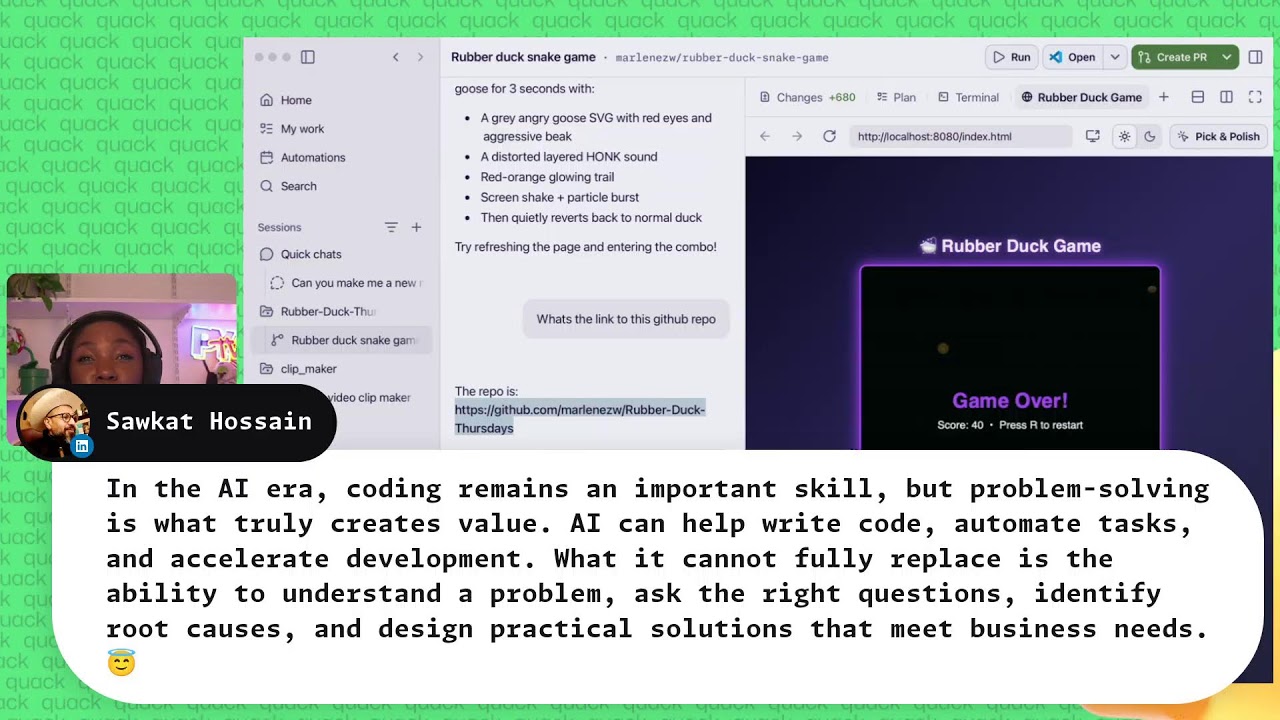
But what does what does everyone does anyone have any last minute questions? I'll keep playing until it finishes and I can ask answer questions if people have questions as well. So, oh, let's Ah, okay. Okay, hang on. I'm clearly so terrible at games. I'm not I'm not great at playing games. Wow. I'm shocked by how I am struggling with my own game. Okay, there we go. It's done. So, now the secret Easter egg is in. Press double d, you know, double up, double down, and then the rubber duck transforms into Andy goes for 3 seconds.
Try refreshing the page and entering the combo. Okay, let's try it. Let's try it. Let's see if this is going to work for us. So, let's press any key to start. Okay. And what's that? One, two, one, two. Ah, there's the so Oh my gosh, that was amazing. I love that so much. Oh, wow. Emily forgotten. Yay. That was so fun. I feel like this was amazing. So, I love this. Um I This is all available. The GitHub Copilot app is so fun. It's so easy to use. If you want to try this out yourself, please go ahead and download it.
Let me actually now share the links that you can use. Let's also ask what's the link to to this GitHub repo. Um, and then I'll get the I'll I'll like commit have the let's have the agent will go ahead and commit everything that we did on this stream so you can try it yourself. This is the GitHub repo. I'm going to post it for us in the chat and then I'm also going to go ahead and switch over so that you can see the repository where you can install the where you can install the app if you want to try out the app.
So this is the that one is the repository for the game we just built. And then if we go to I'm just going to look for it. If I go to GitHub and I go to the co-pilot app, I'll I think you got to go to the the GitHub or is what I'm assuming. Let me look for it. And then you've got to go to Copilot app. And it's super easy to download. You just go to GitHub and and there's like instructions on how to download it there. Um, and I'm just going to show you exactly what that looks like.
Oh, I don't want to do that. Um, hang on. Okay, it's asking me to sign in. Okay, this is the thing. You have some We have a lot of security. Um, so I'm doing this offline, so you can't see like what I'm doing, but I'm about to share with you the the links uh you can use to grab the Copilot app and try it for yourself. Uh, okay. You know what I'm You know what I'm going to do? I'm just going to try and GitHub Copilot app. I don't think I need to be logged in for this.
Okay, here it is. Perfect. So, here is the link. Um, I will share the link with you. So, this is it. If you want to grab the app itself, the GitHub copilot app, you can use this link here. I've pasted it in the chat and I'm going to show this here. So, go ahead and try the GitHub Copilot app. There's some instructions there. You can go to the GitHub. It has some instructions on how you can use this and it should just work. It's so fun to use. We've been using it all throughout this stream and I I felt like it's made me really enjoy this stream very well.
And yeah, I appreciate Alexandra. Thank you for the Easter egg suggestion. I thought that was great. Um, okay. Last minute questions. What are some last minute questions? Um, Jake is saying, "When Copilot proposes a new feature, can it compare multiple implementation options and explain the trade-offs before making changes?" Yes, it can. You can do that. You can ask it specifically to do that in implementation mode, and it will explain the trade-offs for you. You also have an automated rubber duck in the app. So when you ask for a review or you ask for big changes, it's going to make those changes and those changes if they're large enough, it will get an automated review.
So that will be great. Let's put back the um uh okay, someone is asking one more question. What is more important in the AI era, coding skills or problem solving skills? I think problem solving skills are always and this is not just in the AI era right this has just been across the board as a software engineer um I know for myself like in my career the coding skills have come as a result of the problemolving skills so I think if you're a creative person if you're someone who is like curious it's it's always going to be problem solving that's you should prioritize for Sure.
So, great question. Um, yeah, I mean, this is the link. Go ahead and check out the GitHub app if you would like to take a look. That's great. Um, I do see a long comment from Sav Sav Cat who says, "In the AI era, coding remains an important skill, but problem solving is what truly creates value. AI can help write code, automate tasks, and accelerate development. What it cannot fully replace is the ability to understand a problem, ask the right questions, identify root causes, and design practical solutions that meet business needs. Yes. Exactly. Exactly. Yes.
This is exactly what I believe. That's exactly what is true is that ultimately AI is a tool. You know, AI is not this. It's amazing. It's an incredible technology that we have, but at the end of the day, the human is first. The human is in control. You know, at the end of the day, you as a human, you can literally decide you don't want to use AI. And that's actually okay. If you don't want to use AI as a developer, you don't have to. You can decide how much AI you want to use or how little.
So, you don't have to use the copilot app. If you want to look at your files, you can look at them in VS Code. I still look at files personally. I love files, but I also like the copilot app as well for some things for quick development. So, you really have a lot of choice as a developer. And remember, at the end of the day, you are the person who is using these tools. So, you're in control and you don't have to do things you don't want to. Ultimately, these tools are supposed to just make your work more fun, more enjoyable.
We saw that there's absolutely no way before AI, I would have built a a game like that on the stream, but we built such a fun game in like two seconds. And and I thought it was really fun. So, at the end of the day, the truth is that we as developers can use AI if we want. You don't have to if you don't want to, but it makes things a lot more delightful for some things and also makes your work very enjoyable and and can potentially make you productive. So again, today we saw the GitHub co-pilot app, the brand new Copilot app.
If you want to check it out, look at the link that I have just posted. It's in the comments. It's on the screen. And yeah, I had so much fun today, everyone. Thank you so much for joining us. I'll see you next time. Thank you for the nice comments everyone as usual and we'll see you next week on the stream. Bye.
More from GitHub









Get daily recaps from
GitHub
AI-powered summaries delivered to your inbox. Save hours every week while staying fully informed.