The Steam Controller is Here

Chapters9
An overview of the Steam Controller's aims, its unique blend of a traditional controller with a trackpad, and the author’s initial impressions on its design, features, and potential appeal.
Valve’s Steam Controller 2 blends trackpad precision with modern console-like ergonomics, delivering vast Steam Input customization but at a steep $100 price point.
Summary
Linus Tech Tips’ deep dive into the Steam Controller 2 presents a curious blend of nostalgia and refinement. Linus praises the improved trackpads, now larger and more like the Steam Deck, and highlights how the device can map to non-traditional games through Steam Input, even letting you use community configurations. He notes the back paddles, improved gyroscope, and the clever wireless puck that doubles as a charging dock and updater, calling this one of Valve’s most thoughtful hardware gestures. Ergonomics spark mixed reactions: he finds the handles still not perfect for smaller hands, and he’s not shy about comparing it to a modern Xbox or DualSense controller in feel and value. The video balances enthusiasm for the new Hall-effect style joysticks and low power draw with candid caveats about price, perceived value, and the trade-offs of a controller aimed at both desktop and living-room gaming. Throughout, Linus peppers in real-world tests and comparisons (Forza Horizon 5, Ano, and gyro-based demos), while repeatedly circling back to Valve’s open hardware approach via Steam Input and iFixit replacement parts. He also toys with potential future Valve strategies, including a Steam Machine ecosystem and speculative pricing that might frame the device as a value proposition alongside other peripherals. The segment closes with practical tips on setup, a nod to Dbrand’s skins, and a call back to past controller showdowns for context.
Key Takeaways
- Steam Controller 2 uses capacitive trackpads inspired by Steam Deck, offering intuitive navigation for non-native controller games.
- The magnetic wireless puck acts as both the 2.4 GHz dongle and the charging dock, supporting firmware updates for up to four controllers.
- Hall-effect joysticks in the Steam Controller 2 deliver low drift and high precision with better durability than traditional potentiometer sticks.
- Thirty-seven hours of continuous gaming were observed in lab tests with haptics on, highlighting strong battery life for diehard users; yet the price is a sticking point at $100 compared to other options like the DualSense or a couple of cheaper controllers in aggregate value terms.)
Who Is This For?
Essential viewing for PC gamers and early adopters who want to understand whether Valve’s Steam Controller 2 is worth a $100 investment, especially if you rely on Steam Input and couch-friendly setups.
Notable Quotes
""The best thing about the joysticks, though, is actually under the surface... Hall effect joysticks give us the advantages of both.""
—Explains why Hall-effect joysticks matter for precision and durability.
""Gyro aiming is such a gamecher for old school keyboard mouse guys like me... the flexibility to activate it, either like this or like this is just incredible.""
—Highlights the gyro-based control as a standout feature.
""Over 37 hours of continuous gaming. That is outstanding news for diehard fans of the original Steam Controller.""
—Cites battery life as a major positive outcome in lab tests.
""Why not make your wireless dongle also the charging dock? No more unplugging and plugging in a type-C cable constantly.""
—Praises the integrated charging dock design.
""If Valve could say with a straight face, 'Yeah, but it includes a Steam Controller with a $100 value'... that would be part of their thinking.""
—Speculates on pricing strategy and perceived value.
Questions This Video Answers
- How does Steam Input support gyro aiming across non-Steam games?
- What makes Hall-effect joysticks better for long-term use in controllers?
- Is the Steam Controller 2 worth it at $100 compared to using two cheaper controllers?
- Can the Steam Controller 2 work with non-Steam games or non-Steam hardware setups?
- What is the role of the Steam Controller 2’s charging puck and how does it compare to traditional wireless adapters?
Steam Controller 2Steam InputGyro AimingHall-Effect JoysticksTMR (Hall) JoysticksTrackpadsValveSteam DeckiFixitDbrand skins
Full Transcript
My fellow gamers, rejoice for we have been gifted from on high the perfect device for PC gaming. Well, on paper at least. Since my hands on a few months ago, I have gotten some more intimate time with the Steam Controller with all of its features, a launch date when you can finally get your hands on one, and I've gotten a price. And I've got a lot of thoughts, especially on that last one. Some of you won't care about them. The diehard fans of the original Steam Controller who have desperately waited over 10 years for Valve to follow it up.
You guys might as well open your wallets now because the new Steam Controller, it's the original but much, much better. For everyone else though, it's something of an enigma. It's a controller. It's a trackpad. It's it's a bridge between your traditional gaming battle station and your living room. And it's it's unlike anything else on the market. Up top is a standard symmetrical style layout with all of the buttons and sticks that you'd expect from a modern controller, plus a few extras that you might recognize from the Steam Deck that are going to help you navigate Steam OS and Steam Big Picture.
Below that are the stars of the show, the multi-purpose trackpads. More on those later. First, I feel it's important to remind you guys how much of a controller review is preference. What's true for me and for David who might not be true for you. With that said, then the feel of the Steam Controller is it's just okay. The plastic of the body feels a little cheap compared to first party offerings from, if I'm being honest, all of the big three. And I think a lot of fingers are going to land on top of some of these screw holes here on the bottom, which is kind of a surprising oversight for a company that is normally so thoughtful in their hardware designs.
Or maybe it was thoughtful. Maybe it was an intentional nod to repairability. Valve has confirmed that they will continue their partnership with iFixit for replacement parts. So kudos to both of them, even if I do like our precision screwdriver set just a little bit more. ltstore.com. What I can't make the same excuse for is the ergonomics. While Valve did go to the effort to change the angle of the handle pieces here compared to the Steam Deck, which is obviously meant to be held in a in a wider stance, I found that for my preferences, they didn't go quite far enough, and it feels more like holding an 8-bit Dough controller compared to an Xbox controller.
I also found that the thumb sticks were a bit of a far reach for those of us with smaller paws. And if you like to flat thumb them, their positioning increases the chance of thumb kissing. With all of that said, all of my complaints so far are pretty minor. And in terms of the thumb stick feel, the Steam Controller is both good and wellfeatured. I'd say the closest non- valve analog, pun intended, would be the Xbox controller with its similar raised textured edges and flat smooth middle that makes it easy to both landmark your position and maintain traction as you're moving around.
And the Steam Controller has an extra party trick with capacitive sensors in both tops that can activate or deactivate six-axis motion controls. The best thing about the joysticks, though, is actually under the surface, but we'll talk about that a little bit later. First, the face buttons feel pretty close to what we've come to expect from an Xbox controller with a soft, and hey, if you game late at night, you might like this quiet rubber membrane, but the way less clicky bumper might actually appeal more to PlayStation gamers. I'm personally not a big fan. Moving on to the triggers, the spring gives them adequate resistance, but they have neither the rumble from the Xbox side nor the adaptive resistance of the Dual Sense.
On top of that, they don't have a toggle between short and long travel, and they don't even have the two-stage activation of the original Steam controller, which is going to be a real disappointment for its dozens of users. What won't be, though, is the tactility of the four paddle buttons on the back. These are great. Now, to be truthful, I'm too old school to use them in most games. But when I do need them, boy, do I ever need them. And I am stoked that Valve is pushing this feature to be the norm for mainstream controllers.
They sit at just the right spot for easy access, which does mean you'll get the occasional accidental press while you get used to them, but they're just stiff enough that with a bit of practice, you'll be able to press them intentionally without it interfering with your ability to hold onto the grip. Ooh, speaking of the grip, sensors inside it are actually another way to activate the six-axis gyroscope inside. Valve has traditionally taken a very open approach to how you can use their hardware. And with the Steam controller and Steam Input, you can configure pretty much any control schema that you'd like, even in games that don't natively support remapping.
And if you don't feel like doing all that work, you can even use community configurations. Guys, gyro aiming is such a gamecher for old school keyboard mouse guys like me. And the flexibility to activate it, either like this or like this is just incredible. Uh, since we're back here though, this would be a perfect time to talk about the charging pins that connect to the included wireless 2.4 GHz puck. This is a major highlight for me of the Steam Controller. This is exactly the kind of thoughtfulness that I love to see from Valve. Why not make your wireless dongle also the charging dock?
No more unplugging and plugging in a type-C cable constantly, which should help save on wear and tear on the controller's port. And setting it up is simple. You just plug in the included type A to type- C cable. Actually, a pretty nice feeling quality. It's a really similar sleeve to what we have in our True Spec cables. Then you attach it using a magnet, press the Steam button on your controller, and away you go. It even supports wireless firmware updates and up to four Steam controllers paired to a single puck, meaning that you can use the extra ones that come with all of your other controllers to connect to additional PCs or to set up charging in convenient multiple locations like this convenient segway to Dbrand who sent over Oh my god, this is amazing.
It's like a skin for your Steam machine. Stick around at the end of the video for more info, or you can check it out at the link down below. There's so many great products on ltstore.com, but shipping is so expensive. That's why we're bringing back Shiptorm. From April 24th to May 7th, you can get free shipping sitewide on ltstore.com on any order over $150 in the US and Canada or $225 worldwide. No code required. Just load up your cart and get free shipping. Link down below. Now, there was a major claim that we made before that has since gone completely unressed.
That the Steam controller would bridge controller and desktop gaming. All right, that's where the haptic trackpads come in. These are Valve's best haptic trackpads yet. Gone is the weird concave trying to be sort of a joystick alien eye design from the original Steam Controller. And enlarged is the flatter, squarer design from the Steam Deck. If you've ever used one of those, you're going to know already what a lifesaver these things can be for navigating experiences that are not optimized for a controller, and in some cases, even playing games that outright don't support controllers. And then there's everything else that they can do.
Check out this footage of an old school Steam Controller fan playing Skate. Tommy B loves his trackpad input so much that he went and created his own controller and he's got gestures bound to his trackpads and demonstrated how insanely natural this type of input scheme can be once you've set it up. Now, I'm not going to pretend that I'm the right person to show off that functionality. But what I'm absolutely the right person to test out is playing a traditionally non-controller friendly game like Ano. Hey. Okay, this is very intuitive. It's very WD and camera for these two.
I can zoom in, I can zoom out. And don't forget, you could use a community profile as a starting point and then customize it to however you like, dude. I am playing an RTS on the couch right now. Come on. Ooh. Right. Do you think you could play the whole game without a mouse and keyboard? I could. Do you want to play the whole game without a mouse and keyboard? this particular game with its like very fussy kind of finicky controls, maybe not. But I could see myself actually enjoying the genre with a controller where I otherwise completely wouldn't be able to.
And in that way, the Steam Controller is a unique and maybe even solid value proposition at almost any price. But what if you prefer genres where the trackpads matter less than precise button presses and timing, the platformer? I can definitely see why people would like the ABXY. I can also see some people not liking them. I think both are completely valid opinions. I wouldn't describe them as mushy, but because of the softness, they're not quite as responsive as some can be. Yeah, I've come around on clicky button controllers, and so these felt a little too soft for me, but they're definitely fine.
They're fine. Yep. They're not bad. They're fine. One thing I can say with absolute certainty though is no one's going to be bothered by the latency and these joysticks are a pleasure to use. That makes a lot of sense. The Steam Controller 2 did really really well in our labs testing for input latency. I mean, you you got to imagine a company like Valve, gamers through and through, they're going to have that kind of attention to detail. Yeah. The only controllers that did better were ones that are kind of competitively geared. Ooh, I'm trying a D-pad now.
You know what? It's one of those D-pads that doesn't feel good to me. No, but it works for me. Yeah. When I talked to Valve, they said they put a lot of work into getting the diagonals down, but I actually think in just terms of feel, I think I like the Steam Deck D-pad better. Interesting. That being said, all modern D-pads are my enemy. That's a fair and valid take. Quite frankly, this is not really testing some of the other faculties of this controller. Why don't we try Fortza Horizon 5 to get a sense of the triggers and the haptics?
To Valve's credit, while they may be missing haptic triggers, the actual tightness of the haptic feel of the controller itself is a really strong point. Definitely better than the deck and miles ahead of the original Steam Controller. As for the triggers, I remain uninspired. I don't feel like they contribute to a loss of control. That's just my crappy driving. but they are very unexciting. What I find with the rumble triggers or the haptic triggers is I don't really care that much when they're not there, but when they're there, they really do elevate the immersion and the experience.
And so, it is a little bit of a a missed opportunity here. I think that's enough racing. Why don't we try something where you get to use the gyro? Oh, yeah. Gyro aiming is such a freaking hack. Uh, we don't have the toggle on right now though. So, in this game, it's built in by default. So, you actually can't easily turn it on and off with the handles. That's more in the case where you're assigning mouse look to a gyro thing c like customized via the Steam input, right? I hadn't tried this game before, but that makes sense because Sony has support for that natively, which is nice.
All shooters should include it, dude. It's like it's it's sick being able to like make your your macro adjustments here and then your fine adjustments here. Especially in a game like this where each shot matters so much. So much. You'll have like three arrows left and you'll have like three absolute ridiculous monsters charging at you. I'm still in awe that the customization in Steam Input allows you to just assign gyro aiming into any game that has mouse support. Like, how flexible is that? How wonderful is that? Thank you, Valve. Yeah. And you don't need a Steam controller to take advantage of that.
You could have like an old PS4 controller and do the exact same thing. So cool. I am not an FPS controller player. Not by any stretch of the imagination. I suck. I got to make that really clear. So, while nothing I'm doing is particularly impressive, this is not my usual level of suck. Not even not even close. That gives me a great opportunity to talk about what is probably the best hidden feature of the Steam Controller 2. It's TMR joysticks. Hall effect joysticks have been getting a lot of good press over the last few years because they offer better durability compared to potentiometer joysticks that use contact pads that measure the movement of the sticks.
contact pads that will inevitably wear out causing drift. By comparison, Hall effect uses magnets that don't make physical contact. Now wear, no drift. But power draw is a big downside. That's where TMR comes in. Tunnel magnetoresistance joysticks give us the advantages of both. Outstanding precision, so I can really get those dead zones down, so every little movement matters. great reliability and low power draw. While the Steam Controller does hold up pretty well against the most popular controllers on the market, there's kind of an elephant in the room. You're going to make the noise. It's an elephant, right?
As we discussed recently in our 16way controller shootout, the popular controllers, not necessarily the best controllers anymore. So, let's pull out one of David's favorites, the Cyclone 2 from Gameser. It's worth pointing out that the pairing process of the Steam Deck and the Cyclone seems like it would be similar cuz I have a dock for the Cyclone, but the dock doesn't actually pair it to the dongle. You still need like a manual Xbox pairing process. So, that's definitely a win for the Steam Deck or Steam Controller. I love that we've both accidentally called it Steam Controller 2 at least once.
They should call it the Steam Controller 2. You know, the reason they gave me was because they wanted it to not be confusing. B. That's why they called it the same name as the old one to avoid confusion. That is like that's insane. I got to give I got to give full credit to Valve. It's a good joystick. According to our circularity tests from the lab, it performs very similarly to the Gamester in terms of the accuracy of its circularity, but it does have a bit of a different response curve. So, you might find that going from one to the other might feel a little bit different.
That's all going to be down to personal preference, though. That's not like better or worse. If anyone was looking for the proof of what I said earlier, that I am not an FPS uh controller player. I will say it does look like you're having a little more trouble with this controller than the Steam controller. This is an accurate controller by every metric, but it does go to show that the Steam Controller is a very good controller. And one of the ways that it's excellent is battery life. The lab used for donuts in order to simulate regular use with the haptics going off and found that the new Steam Controller put up a really impressive result.
Over 37 hours of continuous gaming. That is outstanding news for diehard fans of the original Steam Controller who have so much to love about its successor. It may be a little less committed to the original Touchpad Vision, but it's in a way that offers reasonable compromises and refinement in pretty much every way. It's also a solid solution for folks who JUST WANT TO THROW AWAY THAT LOGITECH K400 on their coffee table. However, if your plan was to use this thing as a traditional controller, I got to say I'm a little less enthusiastic about it. Not because it's bad.
It's a good controller. It's just a $100 controller. And I'm not going to pretend like I can't afford one. But I'm also not going to pretend that I would buy one of these when I could get just about two of these or two fly digies for the same price. How about you? If it was $60, I would buy day one. If it was $80, it would be like 2 weeks later. At $100, I think I'm out. And I'm willing to bet that's not really going to be a hot take. Uh but I also feel for Valve here.
Can you imagine releasing hardware in this current market condition? When I chatted with Valve, they felt like the retail price for the controller represented the hardware and engineering that went into creating that. And I can't argue with that fact. But a controller is also about the feeling. And compared to the Dual Sense, uh, that I would argue has a pretty equivalent amount of value wrapped up in its features, I would say that the Dual Sense feels better. Yeah. Okay. Crazy theory. What if they made it $100 at launch to help make the Steam machine look like a better value?
Whether it's $800, $900, $1,000, $1,200. I mean, who knows with the RAM apocalypse wreaking havoc on the market. If Valve could say with a straight face, "Yeah, but it includes a Steam Controller with a $100 value, maybe that's part of their thinking." I could see that. There's no way that that's the whole picture, but it wouldn't surprise me if that was part of the consideration. It also wouldn't surprise me if you segueed to our sponsor. Oh, Dbrand. Oh, we're going to look at the thing. Surprise, surprise. DBR is already hard at work making overpriced tape for the new Steam Controller.
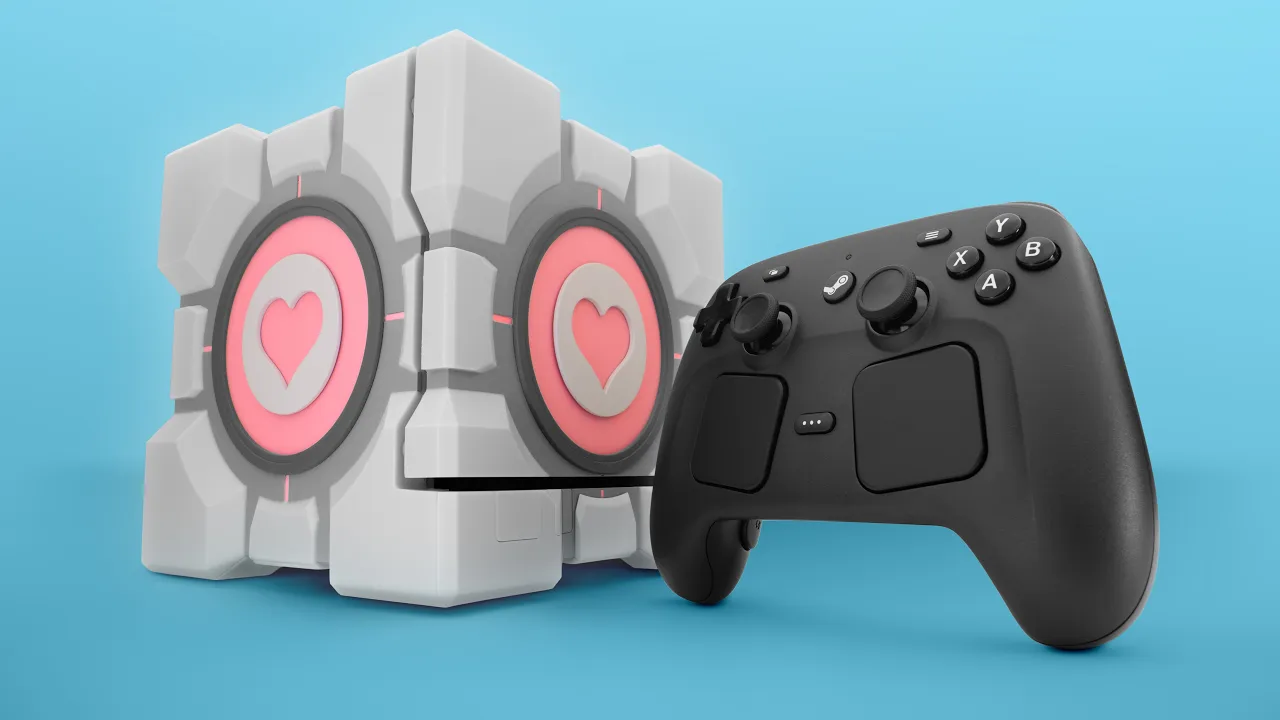
We'll have to put a photo of it on the screen for you, though, because while I'd love nothing more than to show it off on camera, there's um just one small problem. They only sent over these two little squares. Apparently, and these are Dbrand's words, not mine, the full controller skin isn't ready yet, and you'd probably up the install regardless. So, there you have it. Steam controller trackpad skins. Get yours included with a full controller skin that apparently they couldn't trust me with. speaking with things they shouldn't have trusted me with. From my understanding, this is the only prototype of this thing in the freaking world, this is a super early look at their Steam Machine Companion Cube case that they've been working on.
And as much as I love to say anything mean about Dbrand, I can't think of anything that I don't like about this. Obviously, I don't have a real steam machine to put into it yet, thanks to RAM prices, but this is going to be a must-have accessory when Valve does eventually release the Steam Machine. They went deep on the details on this thing, too. I mean, look at this footage of the packaging. The outer carton has a ton of Easter eggs and feels like it came straight out of Aperture Science. It even opens up to feel like you're in a test chamber, right down to the signage.
It might actually be the coolest thing Dbrand has ever made. If you're planning to pick up a Steam Machine when it launches, you should definitely head over to dbrand.com/valve to register your interest for free. And by the way, Gabe, if you're watching, please don't sue these guys over it. You totally could, but just don't. If you guys enjoyed this video and you want to check out some more controller content, why don't you check out that epic 16-way controller showdown that we made last year. Not only was it an efficient way to get impressions on over 16 controllers, it was also really fun.
Are we doing another one soon? I want to. Let's do it. I'd be down. There's been so much more advancements, man. The controller space is moving so fast right now. Go fast.
More from Linus Tech Tips










Get daily recaps from
Linus Tech Tips
AI-powered summaries delivered to your inbox. Save hours every week while staying fully informed.