My Vibe Coding SETUP for 2026 (beginner friendly / non technical)

Chapters12
Introduction to vibe coding and the goal of using AI assisted workflows to build software faster and with better architecture.
Olly Rosewell lays out a beginner-friendly, 2026-ready vibe coding setup using Cursor, Superbase, and AI planning to ship faster.
Summary
Olly Rosewell shares his
Key Takeaways
- Cursor is an AI-first code editor built on VS Code, with features like codebase wide context and terminal integration.
- Edge functions with Supabase handle backend tasks such as user auth, subscriptions, and calling external APIs like weather or AI services.
- Context windows matter: models like CodeEx offer massive context (275,000 tokens) but can be expensive; Opus 4.5 is fast but costly, so plan accordingly.
- Mastering Cursor involves using Markdown files as on-disk brains (PRD-like docs) and cursor rules to keep AI aligned with the project’s style and goals.
- Plan first, then code: use spec mode to create detailed specs before writing any code; use Gemini or Dribbble/hand-drawn sketches to shape UI.
- Model strategy: use Cursor Composer for planning, Opus or CodeEx for execution and deep refactoring, and maintain budget with cheaper models where possible.
- Scope and maintenance matter: keep code modular (under ~200 lines per file), maintain a backlog.md, and ask AI to critique security and edge cases after a feature works.
Who Is This For?
This is essential viewing for beginner-to-intermediate developers curious about AI-assisted coding workflows, especially those curious about Cursor, Supabase, and fast deployment environments. It translates high-level concepts into actionable steps for non-technical builders who want to ship software quickly.
Notable Quotes
"An AI coding agent is a system that can autonomously write, modify, and execute code."
—Defines the core term in the vibe coding framework.
"Cursor is an AI first code editor, built on VS Code."
—Identifies the central tool for the workflow.
"Plan mode is a planning phase where you work with the AI to create detailed specifications before you ask it to write any code at all."
—Emphasizes upfront specification to avoid scope creep.
"If you want to maintain your pricing, plan with Cursor Composer and then oneshot with cheaper models like CodeEx or Opus 4.5."
—Model budgeting and strategy for cost control.
"Keep files small; refactor to modular components when a file hits around 200 lines so the AI can use context effectively."
—Practical tip for maintaining AI performance and code clarity.
Questions This Video Answers
- How does vibe coding with Cursor and Supabase work in 2026?
- Can I start AI-assisted coding with no prior React/JS experience?
- What is Plan Mode in vibe coding and how do I use it with Gemini or Cursor?
- Which models should I use for planning vs execution to control costs in AI coding workflows?
- How do edge functions in Supabase integrate with AI-generated code?
Full Transcript
What is going on guys? This is Oliver, formerly from Response Aai and a few other software tools and now running a few new software tools and roseell.dev. I'm really excited about this video because um I'm going to be going through the full sort of vibe coding setup for me going into 2026. And um I suppose a bit of a prerequisite here is that I am exploring clawed code and I'll be doing some videos on clawed code um in the next couple of days and weeks um because it's really powerful. I don't use it right now.
So I would never do like a video explaining how to use it or how to get the most out of it if I'm not sort of mastering it myself. So what's happening right now? people who may not write code from scratch but who understand systems architecture, they can talk, they can direct, they can ship production quality software really quickly, right? And this video distills how you can do that um and how you can get the most out of it and how I'm doing it. Right? So this video explains my complete model for working with AI coding agents, my vibe coding stack explained, mastering cursor 2.0, know um advanced techniques for maintaining code quality, designing UIs literally from paper sketches and then how to design UIs um with voice flow.
So just talking and then a walkthrough of models and building your first app. Right? So vibe coding is a term that a guy on X or Twitter called Andre Karpathy very important guy in AI he made this up to explain how um software is being made with AI assisted you know workflows right so this is where the developer relies primarily on speaking and giving uh AI agents instructions on writing code rather than doing it manually. So a bit of key terminology. An AI coding agent is a system that can autonomously write, modify, and execute code.
Right? You got clawed code, cursor, GitHub, copilot, wind, surf, droid, that kind of thing, right? Um, now context window, the amount of information an AI can remember in a conversation. Okay, so that's measured in tokens and that's why things can either be expensive or cheap. So modern models, uh, like Claude Opus 4.5, etc., So they can handle sort of a lot of context window. Codeex is like 275,000. It's a lot, right? And spec mode is a planning phase where you work with the AI to create detailed specifications before you ask it to write any code at all.
So my Vibe coding stack that I'm using in 2026, Cursor. So Cursor is um an AI first code editor, right? And it's built on VS Code. you don't have to worry about that too much. But VS Code existed long before AI and people were just using it to write manual code and I got used to that. So then when cursor came out I was like okay I'll use this right now. The codebase wide context means I know that's a lot of words but it just means that when you ask it a question it understands your you know a lot of your codebase which is really good.
There's a terminal integration so you can connect to GitHub really easily and launch your software easily. And there's also support for cursor rules, right? Which we'll go into shortly. Now, Superbase for the back end, right? So, I get users to log in and log out with Superbase. I save their subscriptions so I know if they're in a free trial or if they're paying. Um, I store all their data like their images or their posts or their nicknames, anything right in the back end. And then I use edge functions. So say if I want to ask chatgbt to write me um you know a tweet or chat GBT to um analyze a wall of text right I will ask an edge function which is just like a quick job I will ask superbase um and its edge functions to do that for me like call chat GBT or ask um you know an API like say if I want to um get the current weather you create an edge function to fetch the weather from that API right so Why Superbase for nontechnical builders?
Well, it's generously free, right? It's really AI friendly and has built-in rowle security. In other words, if two users log in, guys, and they have very um private information like say they have a to-do list, user one can never see user two's to-do list. It's very very, you know, obviously important security um to allow people privacy in their app. So that's what role level security is on a very very very simplified uh sort of like uh threshold right now GitHub version control. So, GitHub is almost like save game, right? So, you've made loads of progress on Skyrim or whatever.
Um, and you click save game. In the same sense, um, you know, GitHub stores the code, tracks the changes, it enables collaboration, and from cursor, you just say push this to GitHub, and it will save all of your code to GitHub. Right? As you can see on the right, I have hundreds of files in one of my GitHub projects. I have something like 30 GitHub projects. And the essential concepts here guys. So repository is a repo which is your project folder which is tracked and it has all your code in it. A commit is a snapshot of your code at a point in time.
So if I say I want to commit now it will snapshot how my code looks and save the game. In other words and a branch it's a parallel version of your code for testing features. Right? It's like a test branch. Now Versel is what I use for deployment at the moment. I also use Netlefi which is pretty good but Versel specializes in that front end with no configuration and all you have to do is ask cursor help me launch to Versel and it takes about five minutes to do it right automatic deployments from GitHub so every time I push to GitHub it deploys on Versel and it just makes sense guys it's really easy to use now what you're going to do is create an account for Cursor GitHub Superbase and Versell if you haven't and ideally you would buy a domain right because you can use Versell's custom domains or whatever it may be.
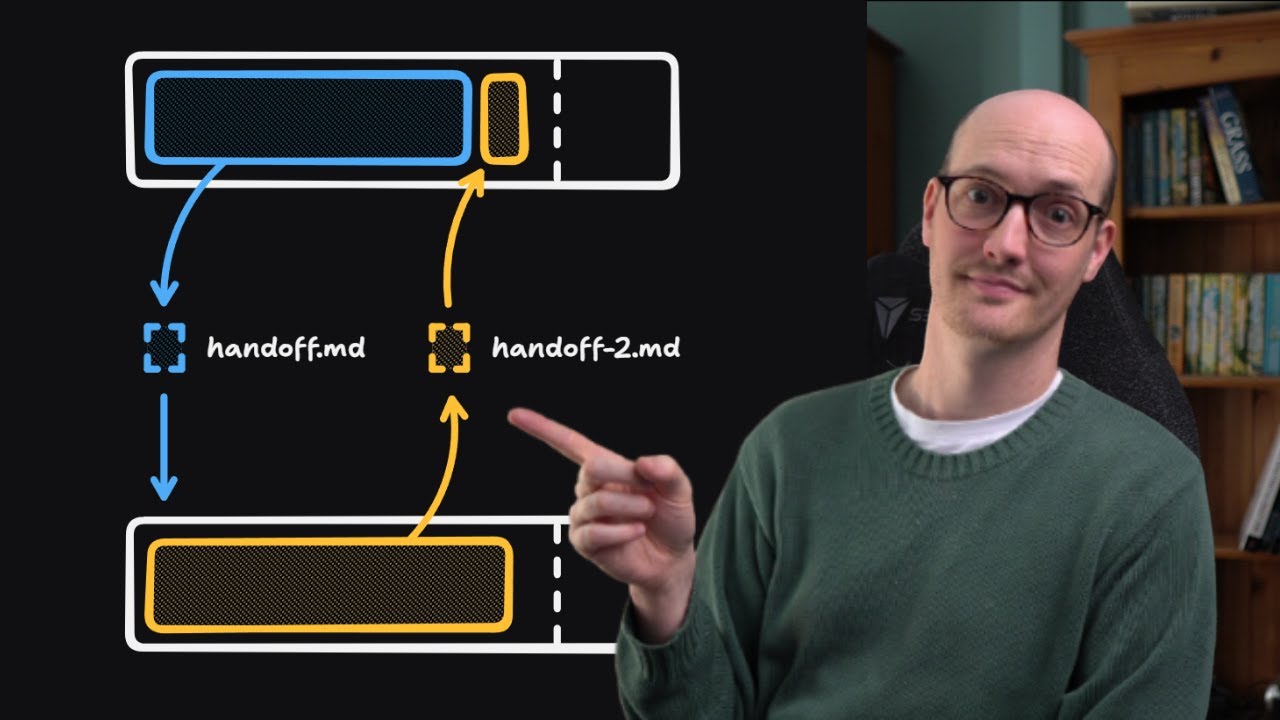
Um, but I would recommend using Versel, right? Versel with a custom domain like buy it from Pork Bun for really cheap. Now, mastering cursor. So, you can use you can obviously ask cursor questions. You can just say, can you do this for me? Right now, that is good, but you can use markdown files, in other words, MD files in cursor as brains on disk, right? That tell the AI how to help you. Um, so you can rely less on being technical and rely less on the AI knowing information out of thin air and more on clear written vibes and examples.
So this is similar to a PRD which I always talk about on the channel which is where you describe I'll talk about that again later. You describe what you want and then you create a product um requirements document uh and then give it to AI so it'll throughout your development process it'll know what you're talking about. So what markdown files are useful for so project instructions it's a living how this project works and what I want like almost like an instructions.mmd that cursor can read whenever you ask it to make code right so style patterns you've got simple style guides like I only want to use this font or always use this spacing or always use these colors right in my current app that I'm building I have a very sort of like plain terracotta orangey vibe like Um, it's like it's almost like that color, right?
Like orangey. And basically from that perspective, my instructions say always use these colors and always use these fonts. So in the end, my app will always look the same instead of it being this vibe coded mess. Right now for bigger features, you can let cursor create or update a plan with the plan mode and then you can create the to-do list and the file references within that and then execute it step by step, which is absolutely insane. You [snorts] create a small instructions file. So you add a new file like um cursor notes. Write in plain language like use TypeScript, keep function short, explain your changes.
I like doing ELI 5. So EI5. In other words, it says look um once you've done all these things, can you explain like I'm five what you've done? You can also go back. Going back, you can also go to cursor.directory directory and you'll see all of the really extensive um cursor rules files that you can just copy paste into your file into your files, right? And you point cursor at it with an at and in the chat type something like use the guidelines in these rules for all future changes now plan and build X or Y.
Cursor will will use that file as context. You don't have to repeat your preferences every time. Now, as you can see on the right, part three is the workflow. So, from being in the shower to literally shipping software. So, phase one is the brain dump. I don't code at all on phase one. I use the basic iOS dictation tool on my MacBook to record a stream of consciousness rant about what I want to build. My prompts to myself. So, okay, walking through the user flow, the user lands on the homepage. It's dark mode, cyberpunk. It's beautiful.
It's like cryptoy. It's really cool. And they see a big input box and it's, you know, they they they they want to click on a stock ticker and they want to see the, you know, the stock prices of Apple and that kind of thing, right? So, what am I going to use? Am I going to use an API from Appify? Am I going to use one of the old Yahoo Finance APIs that don't exist anymore? Whatever it may be. Now, the output, that was all messy, guys. The output is a messy 10,00 text block. And I'm just doing this while driving or you know while on a walk whatever it may be.
The distillation I go to Gemini and I paste it with the instructions. Turn this ramble into a structured PRD a feature list and a user flow diagram. Now the other thing that I often do um and it's something new. I either use dribble. So I go to dribble um with three bs dribble.com and I just take pictures of UI that I love. But sometimes cursor and sometimes all of these different um AIs, they don't know how like they don't really know exactly what you want it to look like, right? It's the best way that I do it is I draw it, right?
I will draw either in Canva online or on a sketchbook online or whatever or I will draw on paper in front of my computer. I will airdrop a picture of the, you know, drawn piece of paper to um my computer and then send it to cursor. Right? You draw a little box on a piece of paper or a title, etc. And you can, you know, divide it into sections. And if you don't want to do that, you literally go to dribble or Pinterest and you look up SAS dashboard or, you know, modern software website, whatever it may be.
Now, the context upload is these images are all saved and I will feed up to like 10 pictures to the AI to make that plan, right? And I'll typically um give all the photos to the AI. Then I will ask it to plan the UI and the design. Now the phase three is the most important part for me. The ask user interview. Right? So from there before a single line of code is written I force the AI to interview me. Right? This aligns our mental models. So the prompt is review the PRD that we got from Gemini earlier and act as a senior engineering manager.
Before we start coding, ask me five to 10 clarifying questions about design preferences, cases of, you know, bugs or logic gaps, whatever it may be. Do not generate the code until I answer these and make sure it's in plan mode. Now, context packing, right? So, context and models. I create a folder called /docs um or inside cursor, you can actually just upload docs to the the docs, you know, sort of like window inside settings. I download the documentation from all the things I'm using for the specific tools. So the other day I needed to understand Gemini's documentation for Gemini Flash 2.5, right?
It's just a really fast um API to like make you know um tweets or posts or Reddit posts or blog posts, whatever it may be. I just copy pasted the entire documentation. I put it into the docs. And as you can see in the bottom right, you just type at and then you say, look, this is my current goal. Build the user settings page and I pin the file or the docs with composer. And this keeps the AI focused on the immediate task, right? Prevents it from hallucinating, that kind of thing. Most important example is recently I said, look, I want [snorts] to be able to write a blog post um based on my loose notes.
Um, I'm gonna post the documentation for Gemini and I want you to create me a function to call Gemini and build a blog post based on my notes, right? It would take the notes from the front end that I've just sort of like scrappily put in um by typing and it'll send that data to Gemini. Gemini responds with a full 2,000word blog post and all that was done um in the span of say 10 seconds and I it's because I tagged the cursor rule or the cursor documentation to follow the Gemini documentation. Right? So basically you've got to just pack all the context you need into prompts by using the at sign and then choosing from the docs.
Now model [snorts] selection, right? I switch models guys based on the tasks. So planning, architecture, cursor composer always, right? If I want to be interviewed by the AI or I want to create a very long um you know intensive plan, I will use composer because it has an immense you know context window. It has an immense sort of brain for that kind of thing. Now, if I'm being lazy and I just want the features that it's uh planned to be totally oneshotted, I would use codeex or opus 4.5, right? Opus is very expensive, guys. So, sometimes on cursor, I'll do a full plan and I will execute it with opus and it sometimes costs like $3, right?
Which doesn't sound like a lot, but it is if you're prompting it, you know, two or three times a day every day, right? like like it ends up being hundreds of dollars a month. So to maintain your pricing, if you want to just stay on the $20 plan, make sure obviously that you are planning with cursor composer and then trying to oneshot with cheaper uh sort of like models. You can oneshot things with composer, but it won't be as good. Codeex is cheaper than Opus and pretty good, but Opus is just mega expensive, right? But it's the king currently.
Now refactoring and you know sort of like solving complex bugs I use codeex right it is slower and more expensive but it thinks deeper about systemic issues and then tiny changes to UI either composer or gemini fast now to sort of like wrap this part up like what do I think about strategic recommendations for actually building software right so you got to maintain scope controls the idea parking lot so AI is fast right but it distracts you you'll see a feature that you want and you'll want to add it and it's all exciting and you don't you shouldn't, right?
You create a file called backlog.md or you use a to-do list app. I literally use the app to doist and it's just free and I just post loads of my stuff in there. I think of something, oh, I need to do that. When you have a cool idea, tell the AI, add dark mode to the the backlogd, right? Do not implement it for now. You focus on the main quest. focus on the main thing that we're planning and executing. And on top of that, then don't let the AI build one giant file with 3,000 lines, right?
Because it'll start getting confused. Like my landing page for one of my projects um a couple of months ago was like 3,000 lines, 4,000 lines. If I even ask it to change the color of the hero section or a color of a button on there, it just loses the plot and blows up because it's like you're asking me to search for an entire search an entire file with the thousands of lines for one button, right? So, if a file hits 200 odd lines, I typically tell the AI, look, refactor this and break the user card component or the landing page component, whatever, into its own file.
small files is smarter AI because it'll be able to use the context better. Now, once a feature works, I ask the AI to critique itself and I ask for a EI5, an EI5. You just built the payment flow. It works, right? I've been able to sign up and pay. Now, review the code you just wrote. Are there security vulnerabilities? Is there a cleaner way to write this? Refactor for safety. Can we add more logs? and explain like I'm 5 years old how this works. And crucially, guys, you can ask it for edge cases, which is when you basically ask the um I just realized there's no image on this slide.
I think it's because I didn't know this slide existed. Um because I thought I deleted it earlier on because it wouldn't load. So, can ask the AI explain like I'm five all of the problems that could arise from edge cases. And edge cases are basically all of these thousands of different possibilities. So possibilities that someone could try and log in and their card declines. It's like well do you let them in? What happens if their card declines? What happens if their card doesn't decline but then they get in and you know it says that they haven't paid.
So they have paid but the app says they have like you have to find all the edge cases and ask AI to manage these and explain to you what will happen. So just to sort of summarize right let's sort of go through this. So you've got the key points the vibe coding stack which is cursor superbase github and versel create accounts for all of these different ones. So cursor github superbase versel and then for mastering cursor the best thing I can give you guys is to create or just copy paste from cursor's directory these um sort of pd m files that you put inside cursor and then it follows the instructions from there.
Then every time you want to execute something big you use at and you tag the important file. Then from there the cursor workflow for me is I create the small instructions file and the um PRD and then every time I want to execute something I will point cursor at it with the at sign to start the PRD at all. When I'm first thinking about building an app, I will use a brain dump while driving or while at the gym or whatever. And then I'll pop it into Gemini. And then from there, if you want to sketch or just steal photos from Dribble, um, you know, that's just the way it is.
Like they're not going to steal the design, you know, line for line, but they are the AI is going to, you know, sort of like use it as inspiration. From there then I interview myself [snorts] um as I go along and then I plan with cursor composer execute with opus or codeex bug maintain with codeex and then obviously I keep a backlog file for all of my ideas. Now guys, obviously any problems at all, any ideas you have, let me know. Any questions, give me a shout. But I'll see you guys in the next one.
And take care.
More from Olly Rosewell











Get daily recaps from
Olly Rosewell
AI-powered summaries delivered to your inbox. Save hours every week while staying fully informed.