Create a Restaurant Booking App (Laravel, Livewire, Tailwind) + GitHub Repo

Chapters8
Introduces the redesign approach using Codex, Gemini 3.1, and local models and points to the GitHub repository for the project.
Tony Xhepa previews an upgraded Laravel restaurant booking app with Codex, Gemini 3.1, and Livewire, guiding you to the GitHub repo and live design updates.
Summary
Tony Xhepa revisits his Laravel restaurant reservation project, this time showcasing a design driven by Codex and Gemini 3.1 alongside a local dashboard model. He points viewers to the GitHub repo at tonyjaba/cloud-restsystem, where you can inspect both the plan and the evolving code. The update emphasizes a Codex-designed admin area and a fresh local-model dashboard different from the previous cloud-code version. Tony walks through the booking flow, choosing a date, selecting a time slot, and confirming a reservation with a visible code. He demonstrates the admin panel's reservations list, filters, and actions like confirm, cancel, and complete. Tables and seating are also managed in the admin area, including adding and editing tables and their capacity. Notably, he mentions AI-assisted creation and live-code updates via Codex’s browser editing, which can update in real time. The video ends with a reminder to clone the repository and experiment, plus a nod to upcoming improvements from Codex and Gemini 3.1 integration.ads
Key Takeaways
- The booking flow includes selecting a date, a time slot, and confirming a reservation with a unique code, demonstrated during the example booking.
- The admin dashboard supports filtering reservations by date and status, with actions to confirm, cancel, or complete reservations.
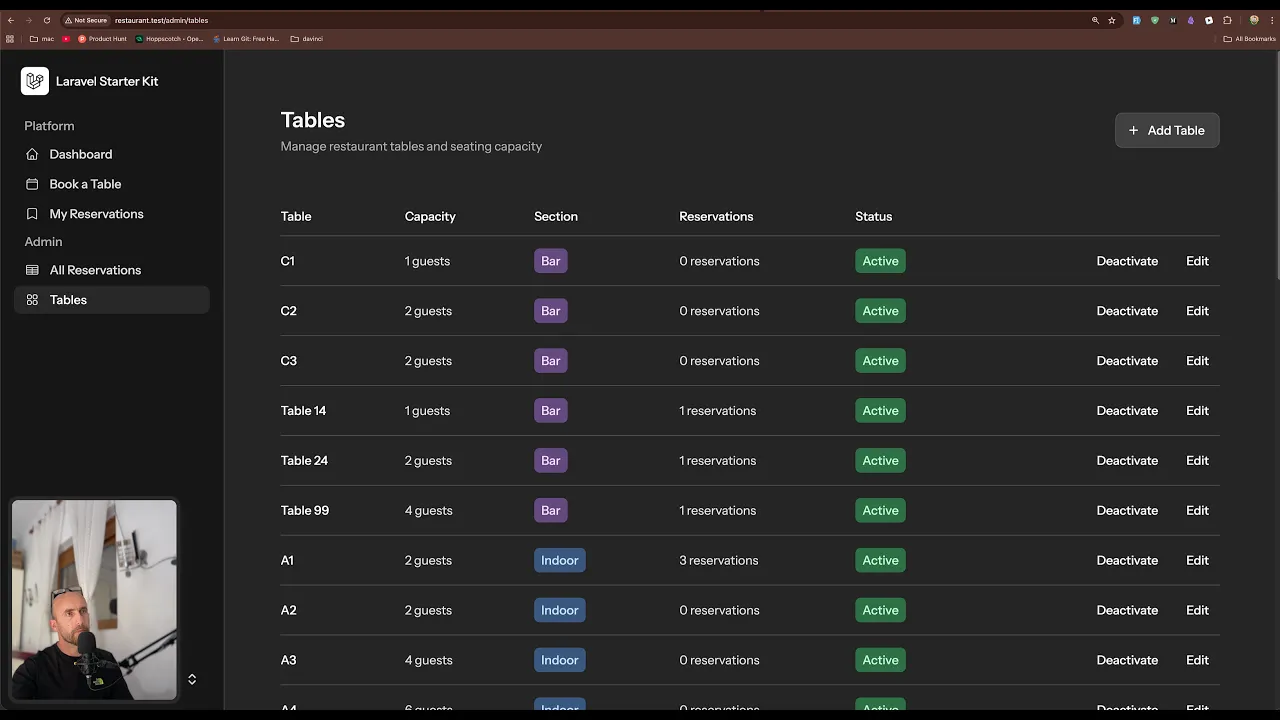
- Tables management is built into the admin area, allowing creation, editing, and deactivation of tables with specific seating capacities.
- Codex-driven design influences both the admin interface and live browser-based editing, enabling real-time updates and feedback.
- Gemini 3.1 is used for the AI-assisted design process and the overall project workflow, alongside local model dashboards.
- The project is hosted on GitHub at tonyjaba/cloud-restsystem, and Tony invites viewers to clone and modify the repo to suit their needs.
- The video emphasizes hands-on experimentation, encouraging viewers to try AI agents or manual edits to customize the system.
Who Is This For?
Essential viewing for Laravel developers exploring Livewire-powered dashboards and AI-assisted UI design, especially those interested in quickly prototyping a restaurant booking system. Viewers will benefit from the GitHub repo link and concrete UI flow demonstrations.
Notable Quotes
"Hello friends, Tony here. Welcome."
—Opening greeting establishes Tony’s personal, approachable teaching style.
"So this one was designed with local model which is a dashboard."
—Describes the design approach and the shift from cloud code to a local model.
"You can clone this repository and work with your AI agent or you can work manually by yourself and remove or add what you like."
—Highlights the repo’s flexibility and the encouragement to experiment with AI agents.
"When I set the edit it's going to the suggest it's going to open the browser here to show you the project and you can comment on live on the browser to update what you don't like and it's going to update in real time like WordPress."
—Points to Codex-enabled live-editing and real-time updates.
"All the best and I going to see you in another one."
—Closing outro with an invitation for future videos.
Questions This Video Answers
- How do I set up a Laravel, Livewire, and Tailwind restaurant booking system from GitHub?
- What’s new in Codex and Gemini 3.1 for AI-assisted UI design in Laravel projects?
- How can I manage reservations and tables from an admin dashboard in Laravel?
- Where can I find the Tony Xhepa Cloud Rest System repo and plan details?
Full Transcript
Hello friends, Tony here. Welcome. In the previous video, we worked with this uh Laravel restaurant reservation system with cloud code and also with local model. But the cloud code, the design of the cloud code was not very good. So in this video, I have designed this with the GPD with Codex and also with local model and also with the Google Gemini 3.1. So this one was designed with local model which is a dashboard. So you can see we have a different design here and you can find this project in the GitHub repository. So if you go to tonyjaba/cloud-restsystem here you also can find if you want the plan.
Okay. So here's the plan and you can work with this with what uh model you like. Also you can make changes like what I'm going to do here. And also this is not finished because the codeex I liked the codeex design and I'm going to work right now with the admin and I think the codeex has finished. If you see the old reservation. Yeah, this is the design right now I think. Let me just come here on the composer rundev. Yeah, this this is how it's looking right now. And I like uh the codeex design.
So this one was created with local model. This one was created with the codeex and as you see is very good design. It's like uh creating a Figma working with Figma and then apply it here for that because I like that this design. I tell also the codeex to update the admin part. So the old reservation which now is looks like this and also tables which look like this. So now we you have this one which is designed by the local this one with codeex and my reservation is with uh Gemini 3.1 also this one is very good so here we have don't have upcoming past and all if we go to book table we navigate the book table which is designed with codex and here we have step one to four first reserve your table for an evening worth dressing up for luxury dark luxury life tables holes and so on.
So, let's choose this date. And here now we have the slots. Let's say 100 p.m. or 2 p.m. As you can see, if we go back, you can see here 2 p.m. for example, is 8 left. 3 p.m. are nine tables left. So, let's choose 2 p.m. And now I'm going to confirm. And yeah, this confirms our reservation confirmed. Your table is secured and we have this code here. Now we can make another booking or we can go to my reservation and we can see we have this here. We can cancel past all and then because we are logged in as admin, we can go to all the reservations today confirmed pending quest live status filters here.
So, all the reservations, order by date, order by time, as you can see, from 1000 p.m. now. And we have the quest, the table, the status, action to confirm or to cancel, to complete or to cancel. And yeah, also on the tables. So we have four tables, 14 seats indoor, outdoor we have two tables with 12 seats on the bar we have three tables we have two tables also active tables 11 inactive we have zero capacity 47 and reservation 26 until now and here is the table active We can create a new table and we can edit and we can deactive.
Now this is created by AI. So I haven't touched the code. You can uh try and update yourself. If you like you can go and clone this repository and work with your AI agent or you can work manually by yourself and remove or add what you like. So this is what I wanted to show you in this video and yeah also the codeex has updated the codeex application. So for example when I set the edit it's going to the suggest it's going to open the browser here to show you the project and you can comment on live on the browser to update what you don't like and it's going to update in real time like uh WordPress.
That's it all about this video what I wanted to show you. Now if you like such a videos don't forget to subscribe, like the video and share with your friends. All the best and I going to see you in another one.
More from Tony Xhepa








Get daily recaps from
Tony Xhepa
AI-powered summaries delivered to your inbox. Save hours every week while staying fully informed.