Claude's new Cursor killer just dropped

Chapters8
Introduction to Claude Code desktop app and how it combines Claude Chat, Co-work, and Code in one UI, highlighting its promise over the CLI.
Anthropic’s Claude Code desktop app aims to be a polished GUI alternative, but Theo’s verdict is mixed: promising ideas, rough execution.
Summary
Theo dives into Claude Code desktop, comparing it with the newer cloud code and Codeex ecosystems. He notes Anthropic’s move to bundle Claude chat, Co-work, and Code in one app, promising lower RAM use and a nicer workflow than the old CLI. But the video quickly pivots to blunt QA frustrations: UI glitches, broken copy/paste, problematic window behavior, and edge-case bugs that slow coding sessions. He contrasts Anthropic’s progress with open-source rivals like Codex and T3 Code, praising openness and reliability in the Codeex CLI/server stack while criticizing the closed nature and polish of the Claude UI. The host points out workflow features that work well, such as split-view threads, remote-control capabilities, built-in work trees, and a usable diff viewer, but repeatedly highlights inconsistent UX and missing polish. He also commends some design choices, like the multi-tab workspace and the ability to preload multiple folders as context, while lamenting the need to modify git ignores for cloud code. The verdict is candid: Claude Code shows momentum and useful ideas, yet the current desktop app feels rushed, buggy, and not ready to displace established tools. Theo teases a deeper comparison across agentic-coding GUIs in a future video, promising a thorough breakdown of strengths and weaknesses. Overall, the video is a practical, opinionated field-test of Claude Code versus Codex-based and open-source options, with a clear nudge toward trying T3 Code for those who value reliability over hype.
Key Takeaways
- Claude Code desktop bundles Claude chat, Co-work, and Code into a single app, contrasting with the separate apps users may be used to.
- Theo notes the desktop app reportedly uses less RAM than the CLI, a win for performance despite numerous UI bugs.
- Edge-case UI behavior is a major pain point, including copy-paste glitches, split-view quirks, and hotkey focus issues across windows.
- Compared to Codeex, Claude Code’s UI feels rushed and less polished, with several not-quite-working features and poor QA signals.
- Work trees and multi-folder context are highlighted as useful features, enabling context from multiple filesystem locations without changing directories.
- Diff rendering and long-thread handling are cited as strong points when implemented well, with external diff tech (Diffs.com) powering the view.
- Theo praises open-source alternatives (e.g., T3 Code, Codex CLI/server) for reliability and ease of contributing fixes, while criticizing Claude Code’s closed desktop UI.
Who Is This For?
Developers weighing Claude-based agent coding tools against Codeex, Codex, and open-source options. This is essential viewing for engineers who care about UI/UX quality, workflow reliability, and open tooling when choosing a coding assistant platform.
Notable Quotes
"CLI are great, but they're not the best way to do agentic coding."
—Hinges the video’s theme: moving beyond CLI for coding with AI agents.
"Not that all CLIs are bad, just that their CLI is particularly atrocious."
— Theo’s blunt critique of the Claude CLI backdrop to justify the desktop app.
"The biggest change with the new Claude Code desktop app is that we finally have an official interface from Anthropic that won't bog your computer down."
—Gauges the perceived win on performance and official tooling.
"If you haven't tried it, do it."
—Promo-like push contrasting Claude Code with other tools, used to motivate exploration.
"Two people working on T3 Code, open-source, were able to make something in 1/5th the time and with far better polish."
—Contrasts open-source speed and polish with Anthropic’s closed desktop app.
Questions This Video Answers
- How does Claude Code Desktop compare to Codex-based tooling for agent coding?
- Can Claude Code's work trees and multi-folder context replace traditional project workflows?
- What are the main UX and QA gaps in Anthropic's Cloud Code desktop app?
- Is open-source like T3 Code a viable alternative to Claude Code for Python/JS projects?
- What are the best practices to integrate AI-assisted coding tools with Git workflows (e.g., worktrees, bypass permissions)?
Claude Code desktop appAnthropic Cloud CodeCodeexT3 CodeCodex CLIAI code review Code RabbitWork treesDiff renderingUI/UX QAAgentic coding tools
Full Transcript
CLI are great, but they're not the best way to do agentic coding. That's why Anthropic finally put out an updated version of the Cloud Code desktop app, and it looks great. Wait, that's Codeex. Let me switch over to the Cloud app quick. Oh, that's T3 Code. Also looks very similar. At least you can use the Cloud models here, though, right? No worry. We'll switch over to the Cloud app now. Oh, wait. That's the new cursor glass app. Ah, okay. For real though, this is the new Claude Code desktop app. It isn't a dedicated app unlike many of the others.
They stuffed this in the traditional Claude app as well as co-work. So, you have the Claude chat, Claude Co-work, and Claude Code all in the same app. And it is a huge improvement from the CLI. I bet it probably even uses less RAM, though I haven't checked that yet. There's a lot to love here, and I am very thankful Anthropic's finally woken up to the fact that a slow, laggy CLI might not be the best way to do real agent coding at scale, especially when you're working on multiple things at once. Anthropic is really hyped about this release.
It seems like they've been working on it for a long time. I know I've been seeing teasers about it for at least a few months now. They have been putting a ton of effort into baking this new desktop app. So much so, they actually tweeted about it from the official Claude account, which almost never happens. It seems like there's a lot of hype around this. So, I took some time to really play with it myself. And I have thoughts. I obviously have a lot to say about desktop vibe coding apps as somebody who has built one myself.
And I will share all of my thoughts and more right after a quick break for today's sponsor. Do you know what Bun Clerk and Nvidia all have in common? They all use today's sponsor, Code Rabbit. These guys get Code Review. Code Rabbit's an AI code review platform used by pretty much everybody nowadays. like companies like Bun, Clerk, Life 360, Ashb, and of course, Nvidia, even Jensen loves Code Rabbit. There's a reason why. From the sequence diagrams to the CLI and IDE integrations to the quality of the code review that you get, you just feel more confident when you ship once you set up Code Rabbit.
If you haven't tried AI code review yet, I don't care what type of work you do. You really need to try it. It's how a lot of my team started using AI in their workflow. So if your company has an AI budget and you and your team haven't spent it yet, you really need to give something like this a shot, it changes how code review works. To be very clear, those 2 million repos running code rabbit right now are not projects that are removing the human from the code review. That's not the point of AI code review.
The point of AI code review is to let the humans focus on the things that actually matter like what does the code do? What are the flows? Is this achieving the goal? Code rabbit can help with those things, but where it really shines is catching all of the small mistakes that take up so much of your brain. I cannot tell you how liberating it was the first time we set up Code Rabbit to realize I don't have to look for these small syntax mistakes anymore and I can focus on what matters, the big picture. Does the code do what we need it to do?
Ship less bugs and waste less engineering time at soyv.link/code rabbit. So let's dive into the cloud code desktop app. The first thing I want to do before we go too deep is justify using these types of guies. I have been amazed at how many people have talked [ __ ] on graphical user interfaces for their agent coding without actually trying them. It seems like developers just feel like the terminal is the end all beall for development. If you can use cloud code in the CLI, why would you ever go use the guey for it? There's a lot of reasons.
Here's a simple one. Screenshot paste. And now I can see the screenshot that I just pasted. I could ask and see it here in the history and click the image and probably even save it. Oh, you can only copy it cuz their app sucks. But you can get an actual interface for things that you're copy pasting. Or let's say I want to copy what it just responded with. I can select the text and copy it. And if I paste this here, I'll turn on word rap so it's a little easier to see. All the formatting is correct.
This is the exact same thread in the cloud code. And if I try to copy this text from here instead, you'll see the problem. It has a bunch of new lines. It doesn't need weird things inserted. It's not a good experience. This has bothered me for so long. Even just the word wrap breaking in weird ways like this because the space got wrapped over. It's just bad. You can fix it. I'm not saying any of these things are end all be all. I'm just saying they kind of suck and they are very inconvenient. Or here where I pasted the image and it attached the image to the tool call prior for some reason and not to the message I sent.
Although that one is actually a bug in the desktop app because for some reason when you paste an image it sends it as a separate message. before the message that you send because they don't even know how to use their SDK. And here is where the roasting begins because this should be good and it is better than the CLI, but it is better than the CLI simply because the CLI is such a trash piece of software that anything is better than it. Not that all CLIs are bad, just that their CLI is particularly atrocious. So, what are some of the issues I'm seeing that make me so upset?
Well, the first one is that the first time I ran this, it did this agent run when I was just asking it to go find performance issues and randomly stopped and then froze the thread. Could this have just been cla behind the scenes? Maybe, maybe not. The icon is still here, which is terrible UX cuz this looks like it's still going, but it's not. For some reason, they just have to stuff that logo there so you know whose butthole it is that you're using. Let's ask the same question again quick. Also, no copy buttons anywhere, which is terrible.
So, manually select that. Paste. Oh god, that that those updates were bad. Yeah, this UI is kind of [ __ ] Allow cla to run. Yeah, I pretty sure I already put it in bypass mode. I don't know why it forgot that. It already made a branch. I'm just asking it to find performance issues. Why is it making changes? Oh, because I approved something, so it's editing the permissions. That's great. Oh, that's really funny. I resized the window so you could see better and it resized everything in weird ways causing ah god if mythos is so good why is this app so bad it missed a few things here that aren't true cuz it's opus which is a good model but is not a super smart model and often misses things well at least it responded properly and then made a branch and PR will give me a button to merge that which is [ __ ] cringe as hell apparently file Open file lets you open a file.
Oh, you said it does nothing. It did something. It put it there. I don't know why that's useful. But if I'm in a thread and I do it, will it still work? Okay, that's hilarious. The files here, but it can't see the file. So, it's just an empty thing. You can click the package. JSON name to copy that to clipboard. God, they this it just doesn't feel like they're trying. It really doesn't. And not only does Codex do a much better job at all of these types of things, Codex is also built on top of the Codeex CLI's app server, which is fully open source.
Again, Codex on GitHub, the whole package, not the UI. So, the Codeex desktop app itself is not open source sadly, but the Codex CLI, which powers it is. And the Codex app server, which is provided by the Codeex CLI, lets you build your own UI like this. That's why so many of these tools support codecs out of the box because you don't even need to build a harness. You just plug into theirs. And from my experience, you can point most agents at this file, at these docs, and they will build something that works, which is really cool.
And if you're worried about the licensing, don't be. It's Apache, too. You're very safe to use this. Not to just glaze OpenAI, I'm still pissed at them for keeping this closed source. I'm so pissed at them that it was a huge inspiration for making T3 code. If the Codeex app was open source like the CLI is, I probably wouldn't have made T3 code. But it's closed source, so I had to make something else. Thankfully, these core pieces that I needed to build it are open source and are well supported. Where with cloud code, I don't even know if I'm allowed.
The gap here is insane. It is absurd. It is frustrating. I am tired. I am upset. I wish Anthropic would at least put effort in if they're not going to let me do it for them. I think you reasonably have two options. Either you put out the things I need to build what I want, or you build something so good that I don't want to. And Anthropic is failing absurdly at both. But there are some things that I found cool. Like if you rightclick any other thread, you can click open and split view. I think you also Yeah, you can hold down command and drag it to do a split view like that.
And if you ignore the awful page layout shift when that happens. Yeah, it's pretty cool. They also have a hotkey to open up the terminal, which I believe is command uh sorry, control backte. So I'm currently in the right tab here. I'm in the right chat. So obviously when I hit the hotkey of control tilda, it's going to open up the terminal in that one. Oh, it opened it in the left one even though I was focused on the right one. And I can't tab out because it uses the tab as an input in the terminal.
So the window you're focused in does not determine which window the hotkeys work for, which is uh great. Also, you can't hit that X button because the grabber for the terminal is touching it. I'm not convinced that anybody who said they've been using this app for weeks actually used it. I hit like five bugs like this before I even made a change with this app. I feel like I'm going mad. I thought that anthropic models were supposed to be good at UI. What happened? There are some features that are promising like you can set up remote control so other boxes on your network can be used to do things.
So if I want to like set up another Mac on my network, I can connect to that and run sessions there from here. It'd be a lot cooler if you could do it from mobile, but their mobile implementation is really focused on cloud code for web, which is an entirely different product, by the way. Cloud code for web is their cloud option here, which uses cloud code in the web without the ability to really run the code. Also, you have no insight here as to what project your new thread is other than this little button where you pick which project.
And it doesn't even have the ones on the side here. So, I can't like go to T3 chat and make a new chat in T3 chat because it's not recent enough to be here. So, I have to go manually find the folder to make a new T3 chat chat. What the [ __ ] Every other one of these apps has all of this stuff, right? If I hop into Codeex, I hover over Shu, I click new, and now I'm in a new chat for Shu. I can click this drop down and pick any of the others in the order they are in on the sidebar.
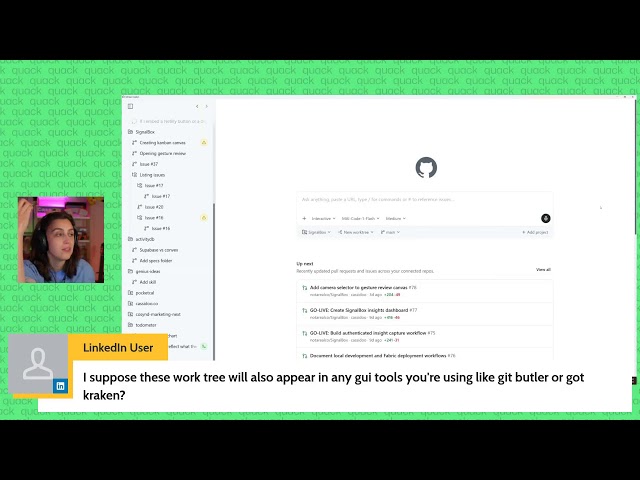
I switched to round now in a different project. Like, are you kidding? Going to do a risky thing and install the nightly for T3 code that Julius just put up so that I can show you guys how we're cooking some of these things. And now we have the nightly built. And not only do we have our projects, we actually go out of our way to grab the favicon if it's placed in any reasonable location that we can find, so it's easier to see which projects are which, but we also have a new add project flow that I'm obsessed with where you can just start typing and very easily select whatever project you want.
Even better than the built-in Mac OS file picker. It's so much better. And yes, I know that the YouTube video compression is not doing me any favors with the grays. will probably change the colors a bit just for my compression or maybe adding some theming, but man, it's so much nicer to add projects with a UI that makes sense for it. Speaking of UI that makes sense, this UI just makes much more sense. I don't want to just sit here and tell you guys about how much better T3 code is than everything else. But if you haven't tried it, do it.
We'll do a more in-depth comparison of all of the guies for Agentic Coding in the near future because there are a lot of them. Like a lot of them. So, if that's interesting to you, let me know in the comments and I'll do a breakdown comparison showing all of the different ones and where their strengths and weaknesses are. Obviously, I have my preferences, but that doesn't mean I'm not trying everything else and seeing if there's good ideas to take. So, let me steal, man. What are the good ideas here? Work trees builtin is cool. Work trees built in and checked by default.
Less cool, but I get it. I think it's a big commitment for them to do that. That is kind of cool. You can add multiple folders as context before starting a thread so it knows that these are folders it can and should access and check into. That's a nice idea. The idea of being able to pull in context from your system without changing the directory you're operating in. That's nice. Normally I just copy paste a path, but this is cool. The coolest thing in my opinion though is what I was showing off earlier with the tiling.
The ability to show multiple chats at once in a view like this. Very cool. If only commandwing didn't put you in weird states. Like I have this here. I'll put this one to the side. And now I'll command W the one on the right. And it does what you expect. It just closes that. But if I command W the one on the left, it puts us in the new chat view. Anthropic. You know what? I'm going to be a little less harsh on them because I know how this happens. AI is really good at building the happy path.
If you describe to an agent a user experience and a flow, even if it has to touch multiple different things, these models, these harnesses, these tools have gotten good enough to do the thing. But as soon as you hit an edge case, like I'm sure that at some point somebody gave the request to the model of make sure command W will close the thread that's currently focused. And they did that as long as it's not the one on the left. If I command W the one on the right, it goes away. But if I have two open, I command W the one on the left, it does this view because it's an edge case.
And models do not find edge cases. Users find edge cases and then have to describe them with the model in order to hopefully get the model to behave. There is a message in chat I want to go in on a bit here. The way the window splits is not going to gain or lose the users. Bigs 360, you couldn't be more correct with this. And this is the problem. And this is the reason that I am being as loud as I am about anthropic. Too many of y'all just accept the [ __ ] slop. The level of slop that is being shipped by Anthropic is unfathomable and y'all just bear and grin it.
You just use it anyways. Despite the fact that there are dozens of better options that have more features, more functionality, more reliability, many of which are open source, too. You just don't care. And now that Anthropic is directly competing with what we have with T3 code, I will say I am a bit scared because no one's going to choose this interface. Of the current options that you have to pick from, the Cloud Code desktop app is close to the bottom, if not the bottom. But it will still become the second or third most popular option simply because you sign into it the way you do the normal Cloud app and it just works.
It's two less clicks to sign in than other options, but then 15 more clicks to do anything. And nobody is paying for their cla so they have access to this interface. They are paying for their cla because they like the models, they like the inference, they like the answers it gives to their questions or the solutions it generates for their code problems. And they're willing to pay a subscription in order to have more access. But instead of Anthropic just embracing the community and making it easier for us to build things like this, they put themselves in such a shitty state that even they caused themselves bugs.
Again, I pasted a screenshot here and it linked it to a message prior. Let's try this again. I'll do a different thread here. Going to paste. You know what? I'll do this two different ways. Also, there's no easy way to delete that. I have to select it and then press the delete key. There's no button for it. I can rightclick delete. That's cool. But I'm going to switch to the CLI to show you how this is supposed to behave. Pasting the image with controlV, not commandV, because the terminal can't have images pasted into it traditionally.
And it puts it in line in the chat as image number one. I ask, what is this? And it puts image one underneath as an attachment with image one in the copy. I I can't believe they actually shipped this like this. It's so bad. But it's below where it belongs. Oh, it didn't update in the UI here. I have to manually refresh it to get the update in the UI. And now image one is in the text here. Ready for this? Pasting the same image here. Asking it to double check. It's no longer in the chat.
I have to re-resoom here for it to update. Waiting until it's done first. Oh, if you resume before it's done, it doesn't even show you that. That's great. Yep. So, the first time it attached as I showed before, and now I said double check, and I put the image before. Are you kidding? like it's just so little taste. There are nicities in the UI like uh let me find the post like someone pointed out that the hover transitions and the menu hovers are better than average. Here's one that pissed me off. You have to choose where to store git work trees for isolated coding sessions and the default is includes.
So you now have to go update your git ignore to ignore this or handle it properly when you use their workree implementation with the defaults which is great. Like as far as I know, cloud code is the only option where you have to modify your project to use it properly. You have to add things to your git ignore. You have to get it to stop dumping [ __ ] in the cloud folder or something else just to use cloud code. Cursor has their cursor rule stuff, I know, but you don't have to do that to use it.
You have to do this with claude. And thankfully, Curser and many others are now embracing the standards like the agent MD and the agents directory skills and all of that. Anthropic still makes you put everything in quad files, quad MD, the quad directory, all of that. One more, and this is petty, but it pissed me off. Having a more button with one additional option, and then customize sidebar. Are you ready to see what customize sidebar has in it? I actually can't believe how pathetic this all is. How' they take so much time and it still feels rushed out?
Like how? Reminder that the Codeex app is actually quite good. Has no problems like this? Like it might not be as pretty, but it reliably works. Things are where they should be. The new buttons behave how they should. You can drag and drop to reorder things. You can pin stuff in a way that makes sense. They have their automation stuff, which is fine. These all work. Like it it just works. It is a little laggy at times, but it works. I honestly think the biggest change with the new Claude Code desktop app is that we finally have an official interface from Anthropic that won't [ __ ] your computer up performance-wise.
Actually, let's see how right I am about that. I am scared, admittedly. Let's see what's wasting my CPU now. Now, the virtual machine service for Claude is using 2 and a half gigs of RAM. Yeah, the Claude desktop app itself is using significantly less memory than before, which is a progress. It's using less than the CLI is, as funny as that is. So, yeah, they fixed the performance issues, but what's left is everything else kind of sucking. Like, I like that. Um, what? I clicked settings here. Wait. Oh god, that's terrible UI. I'm not crazy that this settings button clearly looks like it is associated with the T3.gg project here, right?
Like, I folded that. These two are part of the same, right? Nope, it's not. This is for all things. This inline T3.gg settings button is not for T3.gg. This is for all projects. That was really funny. When I change the one at the top, the drop-down disappears because again, the menu button is literally in that row. So if I turn off image studio 2 or T3 chat, which are below, the dropown stays open. But when I change the top one, the drop down disappears because it's literally rendered in line with that menu item. I'm trying to swear less in my videos and Anthropic is trying to make sure I can't do that because god damn I people in chat are saying they must not have QA.
Like actually though, it's insane. I'm sorry, Theo. It physically hurts to watch the UX in that piece of hot steaming [ __ ] Lol. I'm getting distracted. Do they have no QA? And then all of the laughs. Yeah, this feels like they're testing the limits of how much you can ship a UI that was like [ __ ] out with a single prompt. This is unbelievable. It is so bad. Oh, at least they have forking now where I can fork a chat. That's cool. Does it show me here if this is a work tree or not, though? How do I know what branch this is on?
I don't think I can. Okay, pantic hersel. And yeah, it made a new work tree and doesn't give me any insight into that anywhere. Of course not. Why Why would I need to know that I'm in a work tree? That definitely not important. One thing they did here that's nice is they made it easier to turn off Opus 461 mil, which is from my experience a much dumber version of Opus 4.6. Previously, you had to go edit config files yourself to turn this off. I actually switched to Opus 4.5 in my local cloud code, which has helped even more.
Oh, look. Even though I put on bypass permissions always, it still asks again. Great. Yeah, chat asked, "It's on accept edits again. Does it really not save the preference?" Yep. Oh, if you use voice and have multiple chats. Oh, I got to test this. What else should I add to this project? Are you kidding? Does stop stop the thread or does it stop the transcription? I know it's going to stop the thread, so I'm not going to click it. Oh my god. You know, they vibe coded the multi-tab thing because god damn. And just for reference, here's a dev build of T3 Code where I added multi-tab with scrollable.
And if you open up a terminal in one, it opens up in the one you have selected. This was two prompts. Two prompts. No excuses. I'm done. I did actually come in here excited to try this out, but I just every feature feels so beyond halfbaked. Okay, here's the sidebar diff view. Clicking this doesn't close it after opening it. That opens more things. That closes it. Oh, that popping's bad. Why are these not showing changes? What happened there? Does it not render if it's just additions? Like, why are half of those not rendering? That Oh god.
Can we take a moment to appreciate this icon and this icon? Sidebarification. That one's really funny. It leaves that button in even when it doesn't have enough space to open. So, right now, the second internal sidebar is open. We have to go far enough for it. And for some reason, it didn't unfold all of the things in this diff. Oh, it's not doing it again. See, these two are shown as opened, but they're not opened. I had to close open it to show me. I just They say they've been using this for all of their work.
Either they're lying or their work isn't very serious because this is just like, are you kidding? And like T3 code has had its fair share of embarrassing things. I'm not going to pretend otherwise. We are two people building in the open doing our best to get it working to the best of our abilities. But god damn, this is just slop. I'll make the same request I did here, but I have to manually select this text because I don't have a click to copy. You know, if it was open source, I would legitimately contribute fixes for a bunch of these things cuz it's not that hard to fix most of these things.
Reminder, we have a one-click copy. We have resizing that doesn't break the whole app. And once it makes these changes, I'll show you that we also have a diff view that actually works. Sorry. Wait, do they not have an open in your editor of choice button? Oh, there's an update. I can relaunch to apply. Want to see how many of those bugs have been fixed? I wonder if they just set a cloud code instance to listen to me as I [ __ ] and then prompt it. Okay, so it's updating, but I don't see any proof. Oh, there it is all the way in the back.
Cool. Does voice still input in both text boxes? Yes, it does. Wonderful. How about the terminal? It open in the right one. Say, I bish this on Twitter. Nope. None of the bugs are fixed. Guys, there's two reasons as a lab to build an app like this. Reason one is that you want to lock users in because your goal is to try and get users to be part of your ecosystem so they will continue using your stuff so that if a new model comes out for somebody else, they'll just stay in your app and not even use it.
That's reason one is the lock inside. That's why they're being so shitty about the terms of service because they don't want people to move to another app where it's easy to switch off of their stuff if their models don't keep up. That's reason one. Reason two is because you're trying to showcase how powerful your models and the technologies are. That's why everybody on the cloud code team constantly brags about how they use cloud code for all of the changes they make. This is a [ __ ] showcase. And I hope I pray that people who actually code seriously are as insulted with the lack of basic QA etiquette that exists here enough to use anything else.
Anything else. Again, two people working on T3 Code, the open- source app, were able to make something in 1/5if the time that is significantly better, more polished, more reliable, functional. This feels like a joke. Like, anti-gravity was bad. Anti-gravity was so bad that it caused Ben to crash out in my video. This is comparably bad, but it's not Google, so there's no excuse. Oh, and look, our changes over here finished. So let's view the diff which actually works and renders everything properly. I know so difficult to do that. You can even see different turns and what changed within them because we snapshot all of it.
You have the separate horizontal before after view. You can turn word rap on and off and it just works. Yeah. Diffs.com. Huge shout out to them for making a great open-source solution for rendering diffs in the browser. Also of note is how well we handle long threads. I'm in a nightly and I just wipe my DB so I don't have any. But Julia showed me a thread that literally took 10 minutes to scroll to the top because he has been using the same thread for weeks now for one of the things he was working on.
And the combination of the codeex compression and compaction being good and our render PF being good meant that he could have dozens of turns and millions of tokens in one thread and scroll the whole thing with no issues. I couldn't fathom how long that thread was. All the hotkeys are bound wrong. Cool. So, I'm in the right view here in the new Cloud Code desktop app. There's a hotkey to change permissions. So, if you want to switch from bypass to the DEF O, even though I was focused on the right, the hotkey goes left. Seems like all of the hotkeys go to the first window except for command W, whichever window you're in will close unless it's the first window and then it puts you in the new chat view.
How did they do the binding for their hotkey layer? Julius and I spent so much time trying to figure out the right way to do hotkeys. And Julius spent even more time roasting me when I did them wrong with one of my implementations. Little things like, "Oh god, command 1, two, and three swap between chat, co-work, and code." I don't know about you guys, how often are you switching between chat, co-work, and code when you're working on a code thing? Why would they hotkey that to some of the most useful hotkeys available? Because we have command numbers as switching between your threads.
And notice how when I press like I'm pressing eight right now that they switch instantly because we pre-render and cache properly. So everything [ __ ] works. I'm going to click a thread now. Takes like over a second to load with like nothing in it. Insane. They have routines. Create templated routines that can be kicked off on a schedule by API or web hook. Cool. I can set up a cron that runs cloud code on my machine as long as the app's open. Great. Exactly what I needed. You can customize with skills and connectors. They have a whole plug-in store.
They hid the iMessage one. No, no, they didn't. It's in connectors. Terms of service violation built in. Super cool. So, they can violate Apple's toos, but I can't violate theirs for just using their stuff. That's great. That feels so shoehorned in. I thought they had like a browser thing. Oh, preview. Run your dev server to inspect network requests, debug with logs, and see changes live. That actually sounds promising. Oh, again it has to modify the cloud launch file because you can't use anthropic stuff unless you want to dedicate your project to using anthropic stuff. It has bypass permissions on and I still have to give it permission.
Oh, I got it to ask questions. Will this work? Can I press one and have it do the right thing? It doesn't even submit when you press it. And I can't double press enter will. Okay, enter will submit it. Allow cla to use preview start. I have bypassed permissions on. If this was a vibecoded thing that two small devs at a recent YC company were showing me, I would probably pass on the investment because it is so questionable. But from a multi-billion dollar near trillion dollar company that has supposedly been working on this for months that have been saying constantly that if you like Conductor, just wait.
The new Cloud Code desktop app's going to blow you away. Chat keeps dropping bangers for fun intuitive behaviors like drag and drop. Let's reorder some of these things. I'll move T3 Chat to the top. Oh, I can't move T3 chat. I can't change which project is where. That's fine. I'll just move this thread up to maybe below. Nope. You can only drag the thread so you can put them in pinned or split views. Their little browser is super [ __ ] laggy. And when you turn off their toolbar thing here, it breaks the page layout because now it thinks it's wider than it actually is.
That's super cool. You can select an element and say again, oh, I selected the same element twice. That's great. Make this copy better. That's a great screenshot that it auto includes, barely making the text readable. That copy is worse. You're right. Let me revert it. What would you like it to say? You didn't [ __ ] revert it, though. I'm done. I can't do it. I tried. I The idea of the browser and the model having access to browser and web logs and requests and [ __ ] to fix things seems really cool. I've yet to see it work well enough.
This is not it. I I can't. They I normally would say, well, they tried, but I don't really believe they did. I got nothing. If they're not going to put effort into making the app, I'm not going to put effort into the outro. Goodbye. And make sure you check out T3 Code. It's free, open source, and doesn't suck anywhere near this
More from Theo - t3․gg






Get daily recaps from
Theo - t3․gg
AI-powered summaries delivered to your inbox. Save hours every week while staying fully informed.